Introduction
Web accessibility means designing and building websites so people with disabilities can use them easily. Disabilities can be visual, auditory, motor, cognitive, or neurological. Accessibility helps not just a few people, but anyone using screen readers, keyboard navigation, captions, voice control, or high-contrast settings. It also helps people with temporary challenges, like a broken arm, eye strain, or slow internet.
For anyone learning to build modern applications through a full stack java developer training, accessibility standards provide a practical framework for making user interfaces usable for everyone. Similarly, full stack developer classes often cover front-end and back-end fundamentals, and accessibility ties these skills to real user needs.
What WCAG Is and Why It Is the Main Reference
The most common accessibility guideline is WCAG (Web Content Accessibility Guidelines), created by the W3C. WCAG describes what accessible content should be and gives clear, testable criteria. It works with any technology, so you can use it for plain HTML, single-page apps, mobile sites, and enterprise portals.
WCAG is organised into three conformance levels:
- Level A: Basic requirements that remove major barriers.
- Level AA: Common target level for most public-facing websites and many organisations.
- Level AAA: The strictest level, typically used for specific content or high-accessibility contexts.
Even when local laws differ, many compliance programmes and accessibility audits map back to WCAG. This makes WCAG a useful standard to learn early, especially in a java full stack developer course where projects often include forms, dashboards, and interactive components.
The Core WCAG Principles: POUR
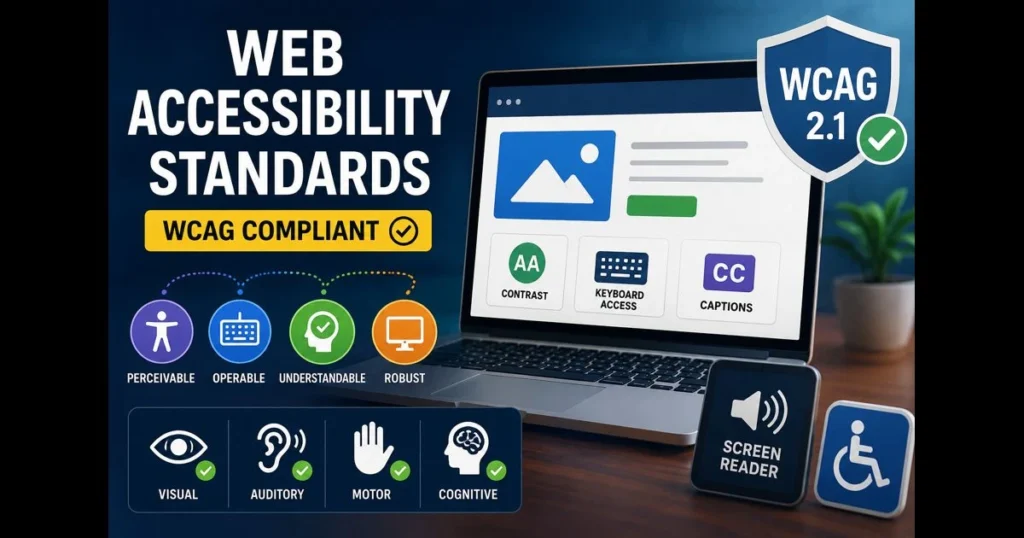
WCAG is built around four principles: Perceivable, Operable, Understandable, and Robust (POUR). These principles help you spot accessibility issues during design and development.
Perceivable: Users Must Be Able to Sense the Content
Users should be able to perceive information in more than one way. Common requirements include:
- Text alternatives for images (meaningful alt text, not file names).
- Captions for videos and transcripts for audio when appropriate.
- Sufficient contrast between text and background for readability.
- Content that still works when users increase font size or zoom in.
For example, if a button only shows an icon and has no text label, someone using a screen reader might not know what the button does.
Operable: Users Must Be Able to Use the Interface
A website must be usable without requiring a mouse. Key checks include:
- All functions should work with a keyboard.
- Users must see a visible focus indicator when tabbing through elements.
- Avoid flashing content that can trigger seizures.
- Provide enough time for users to complete tasks if time limits exist.
Operability matters for navigation menus, modals, sliders, and any custom components often built in full stack developer classes.
Understandable: Users Must Be Able to Follow What Happens
Content and interactions should be clear and predictable:
- Use clear labels, instructions, and consistent navigation.
- Provide error messages that explain what went wrong and how to fix it.
- Avoid unexpected page changes when a user selects an option.
A common failure is a form that only says “Invalid input” without indicating which field is wrong or what the expected format is.
Robust: Content Must Work Across Assistive Technologies
Robustness means your site should work reliably across browsers and assistive tools:
- Use semantic HTML (headings, buttons, links, form elements) correctly.
- Ensure the DOM structure matches the visual structure.
- Use ARIA carefully and only when needed, because incorrect ARIA can make experiences worse.
When accessibility is built on correct semantics, it becomes easier to maintain as the application grows.
A Practical Accessibility Checklist for Everyday Development
Accessibility becomes manageable when teams apply repeatable steps rather than treating it as a one-time audit.
1) Use semantic structure by default
- One clear H1 for the page topic, then logical heading order.
- Use lists for grouped items.
- Use buttons for actions and links for navigation.
2) Design for keyboard and focus behaviour
- Test key workflows using only Tab, Enter, Space, and arrow keys.
- Ensure focus moves into modals and returns to the triggering element when closed.
- Avoid hidden focus traps where users cannot escape a component.
3) Make forms accessible and helpful
- Pair every input with a visible label.
- Mark required fields in text, not only colour.
- Provide specific error messages near the field and summarise errors when needed.
4) Confirm contrast, readable text, and scalable layouts
- Ensure contrast meets common WCAG targets (often AA).
- Avoid small text and low-contrast placeholders.
- Check that layouts do not break at higher zoom levels.
5) Support media and motion preferences
- Provide captions for video content.
- Avoid autoplaying audio.
- Respect reduced-motion preferences when using animations.
These steps are relevant for both beginners and experienced developers, and they fit naturally into projects created in a java full stack developer course.
Testing and Maintenance: Keeping Accessibility From Regressing
A good approach combines automation and manual checks:
- Automated scans can catch missing labels, contrast issues, and invalid ARIA patterns.
- Manual keyboard testing ensures real usability beyond tool reports.
- Screen reader checks help confirm that content order and labels make sense.
- Code review standards prevent regressions when UI changes.
Accessibility is a process, not a one-time deliverable. Teams that integrate it into development workflows reduce rework and improve product quality.
Conclusion
Web accessibility standards, especially WCAG, provide a clear set of guidelines for making digital experiences usable for people with disabilities. By focusing on POUR principles and applying practical development checks—semantic HTML, keyboard support, readable contrast, accessible forms, and consistent testing—teams can build websites that are inclusive and reliable.
Whether you are learning through full stack developer classes or building real-world projects in a java full stack developer course, accessibility knowledge strengthens both your technical ability and the usability of the products you deliver.
For more details visit us:
Name: Full Stack Developer Course In Mumbai
Address: Tulasi Chambers, 601, Lal Bahadur Shastri Marg, near by Three Petrol Pump, opp. to Manas Tower, Panch Pakhdi, Thane West, Mumbai, Thane, Maharashtra 400602
Phone: 095132 62822
Email: fullstackdeveloperclasses@gmail.com