Samsung SP2504C: Complete Guide, Specs, Performance & Everything You Need to Know
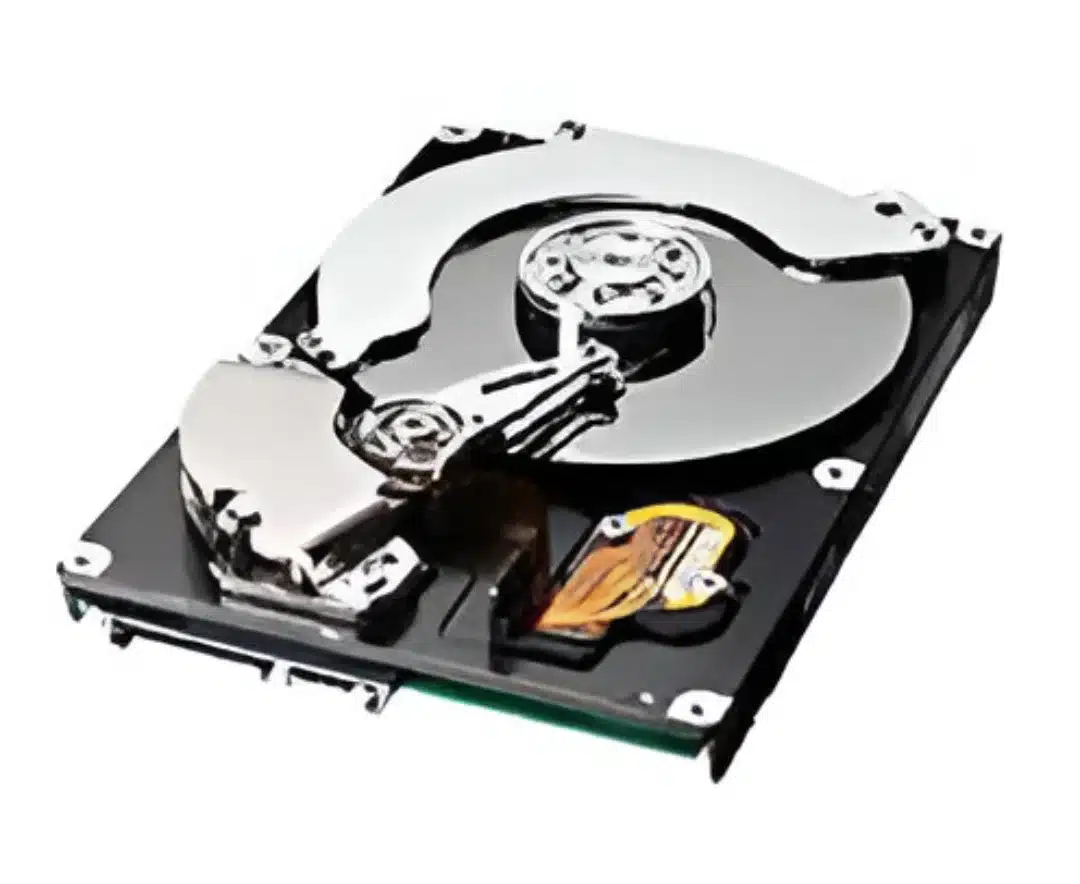
The Samsung SP2504C is a classic desktop hard disk drive designed for everyday computing needs. Whether you’re restoring an old PC, exploring legacy hardware, or just curious about this drive, this article covers every important detail in a clear and engaging way. You’ll learn what it is, how it works, how it performs, its reliability, and how it compares to modern storage. Let’s dive in!
Introduction to Samsung SP2504C
The Samsung SP2504C is a 3.5‑inch internal HDD from Samsung’s SpinPoint P120 series. This drive was commonly used in desktop computers for storing files, programs, and operating systems. It offers a 250 GB capacity, a 7200 RPM spindle speed, and a SATA 3.0 Gb/s interface, which was standard for many PCs of its time.
History and Background
In the early 2000s, Samsung released the SpinPoint P120 series, including the SP2504C, to meet growing storage demands with faster interfaces and improved technology. The launch of this drive brought higher transfer rates and quieter operation compared to older models. Samsung marketed the P120 series as reliable and efficient for desktop use worldwide.
Technical Specifications
Physical and Mechanical Specs
- Form Factor: 3.5″ HDD (desktop size)
- Capacity: 250 GB (advertised)
- Disks/Heads: 2 platters with 4 heads
- Dimensions: ~101.6 mm x 25.4 mm x 146.1 mm
- Weight: ~653 g
Interface & Data Transfer
- Interface Type: SATA II (3.0 Gb/s)
- Max Transfer Rate: 300 MB/s
- SATA Features: NCQ (Native Command Queuing) for efficient queue processing.
Performance Metrics
- Spindle Speed: 7200 RPM
- Average Seek Time: ~8.9 ms
- Track‑to‑Track Seek Time: 0.8 ms
- Latency: ~4.17 ms
- Buffer Size: 8 MB
Internal Technology Explained
Native Command Queuing (NCQ)
NCQ allows the drive to optimize the order of read/write commands, improving performance when multiple requests happen at once. This can help reduce wear and increase efficiency, especially under load.
NoiseGuard™ & SilentSeek™
Samsung included NoiseGuard™ and SilentSeek™ technologies to reduce operational noise and vibration, making this HDD quieter than many competitors at the time.
Smart Monitoring
The drive supports S.M.A.R.T., a feature that lets your system track health status and report potential problems before failure.
Reliability and Durability
Samsung built the SP2504C with durability in mind. It has an MTBF (Mean Time Between Failures) rating in the hundreds of thousands of hours, which was standard for desktop drives of its era. It also tolerates a range of environmental conditions, including shock and vibration resistance for both operating and non‑operating states.
Operating Conditions
- Temperature: 0 °C to 60 °C
- Shock (Operating): ~63 G
- Shock (Non‑Operating): ~350 G
- Humidity: 5 – 90 % (operating)
These specs suggest the drive was built to withstand normal desktop usage and occasional bumps during installation.
Installation and Compatibility
Installing the Samsung SP2504C is straightforward if your system supports SATA drives:
- Power: Connect a SATA power cable from the PSU.
- Data: Connect a SATA data cable to the motherboard.
- BIOS/UEFI: Ensure the drive appears in BIOS or UEFI after powering on.
Older systems may require setting the SATA mode or using a jumper for compatibility with older SATA 1.5 Gb/s motherboards, though many systems auto‑negotiate.
Potential Issues
Some users report that modern SATA‑to‑USB adapters may not provide enough power for 3.5″ drives, so you’ll need a proper SATA power connection.
Real‑World Performance and Use Cases
Though it was solid in its era, Samsung SP2504C does not match modern SSDs or newer HDDs in speed. Benchmarks suggest sequential read/write speeds are much lower than current storage standards.
Typical Use
- Secondary storage for files (photos, documents).
- Use in older desktops or legacy systems.
- Budget storage solutions where speed isn’t critical.
Performance Reality
In modern systems, this HDD may feel slow for OS usage due to long load times and minimal random access performance compared to SSDs. Many users today recommend these older drives only for archive or backup storage.
Comparison with Modern Storage Devices
Compared to modern SSDs or even newer HDDs, the SP2504C is slower:
| Spec | Samsung SP2504C | Typical SSD |
| RPM | 7200 | N/A (No spinning) |
| Avg Seek Time | ~8.9 ms | <1 ms |
| Interface | SATA II | SATA III or NVMe |
| Burst Transfer | ~300 MB/s | 500+ MB/s (SATA) / 1000+ MB/s (NVMe) |
SSDs deliver significantly faster responsiveness, especially in boot time and application load speeds.
Pros and Cons
Pros
- Quiet operation thanks to NoiseGuard™ and SilentSeek™.
- Solid build quality for its time.
- Easy to install in SATA‑enabled systems.
Cons
- Slow by modern standards.
- Limited usefulness as a primary drive today.
- Must ensure correct power connection (USB adapters often insufficient).
Conclusion
The Samsung SP2504C was a capable desktop HDD in its prime, offering decent storage capacity, quiet operation, and reliable performance for everyday computing. Today, it’s best suited for secondary storage, legacy systems, or backup use, not as a primary drive in modern PCs. While technology has moved forward, this drive remains a solid example of early SATA hard drive design.
If you’re restoring old hardware or just exploring legacy components, the Samsung SP2504C still holds value as a piece of computing history.

How to Recover WhatsApp Data from iPhone

How Technology is Changing the Way Children Learn — and Why That Matters
What Are the Best Small Hearing Aids for First-Time Buyers?