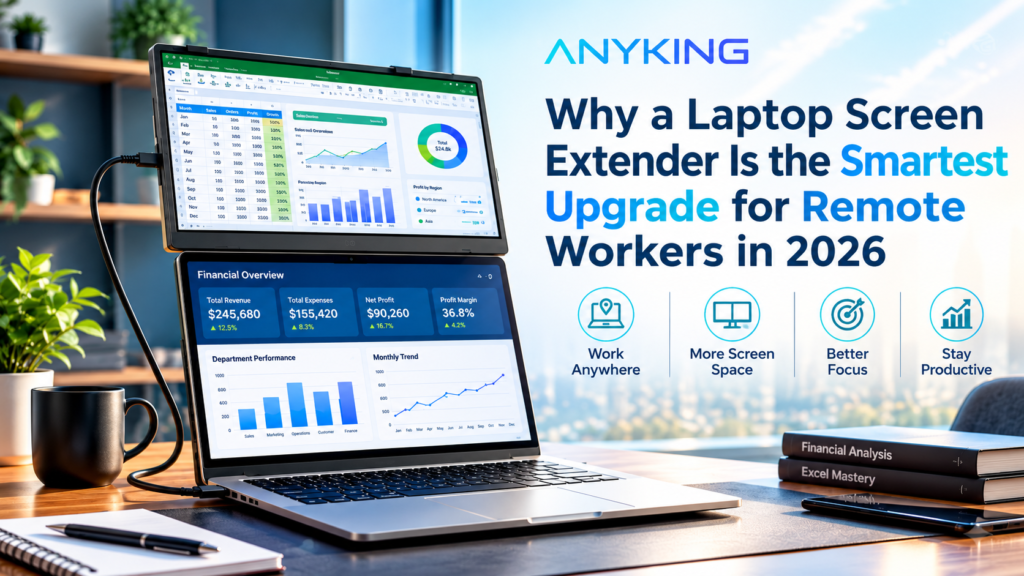
A laptop screen extender is the smartest upgrade for remote workers in 2026 because it adds a second display to your laptop at a low cost. It boosts productivity, reduces constant tab switching, and fits easily into any laptop bag.
If you work from a small laptop screen all day, you know the struggle. You jump between tabs, lose your place, and waste time. A laptop screen extender fixes this by keeping your key apps in view at the same time. This guide explains why the upgrade matters and how to choose the right laptop screen extender for your setup.
What Is a Laptop Screen Extender?
A laptop screen extender is a slim, lightweight display that works beside your laptop. It connects with a USB C or HDMI cable. Your computer treats it as an extra screen, so you can drag windows across and keep key apps in view.
It is different from a standard monitor. A monitor needs a desk, a stand, and a power outlet. An extender is made to travel. You can slip it into a bag and set it up in minutes.
Why Remote Workers Need One in 2026
Remote work is part of daily life for millions of Americans. Kitchen tables, coffee shops, coworking desks, and hotel rooms all count as offices now. A small laptop screen makes each of them harder to work in.
More Space Means More Done
Picture a normal workday. You have email, a video call, a spreadsheet, and notes open together. On one screen, you keep switching. Every switch breaks your focus.
With two screens, your call stays on one side and your work stays on the other. Research on multiple displays often links extra screen space to better productivity. Results vary by task, but the pattern is clear. When people see more at once, they tend to finish faster.
Less Stress During the Day
Constant tab hopping is tiring. A second screen lets you see what you need without hunting for it. Writers can keep research next to a draft. Marketers can watch analytics while editing a report. Developers can keep code beside documentation. These small gains add up over a week.
A Setup That Moves With You
Many remote workers do not have a permanent desk. Some share a table with family. Others travel for client visits. A screen extender fits that life. It is light, quick to set up, and does not take over your space.
How to Choose Between Single, Dual and Triple Screens
Not every worker needs the same setup. Here is a simple way to decide.
Single Screen Extenders
A single screen model is the easiest place to start. It adds one extra display and keeps your bag light. If you want something thin, an ultra slim portable monitor with a fold back design suits travel and small desks well.
Dual Panel Extenders for a Triple Screen View
A dual panel model adds two extra screens. Your laptop sits in the middle, so you get a three screen view. People often call this a laptop triple screen extender setup. It works well for analysts, editors, traders, and anyone who juggles many apps.
If you are hunting for the best laptop screen extender 2026 has to offer, a dual panel model is worth a close look. It gives you a wide workspace from one laptop.
What to Look for Before You Buy
Screen size and quality. A 15.6 inch Full HD display is a strong middle ground. Text stays sharp, and the panel still fits in most bags.
Laptop compatibility. Check your laptop size and ports first. Most models need a USB C port with video support or an HDMI port.
Weight and thickness. If you travel often, every ounce matters. Choose a slim and light design.
Build and mounting. A sturdy stand or a detachable design lets you adjust the screen to your desk or your lap.
A Look at the Screen Extender Market
More people work from home, cafes, and shared spaces than ever before. That shift has pushed demand for portable screens. Buyers now have many options, from basic single screens to wide dual panel setups. The challenge is picking one that fits your laptop and your daily routine.
Anyking designs portable screen solutions for people who work on laptops. The range includes single screen extenders, dual screen extenders, and slim portable monitors. The idea is simple. Give remote workers, students, and business travelers more screen space without extra bulk.
Easy Ways to Get More From Your Second Screen
Buying a second screen is only the first step. How you set it up matters just as much.
Place the extender next to your laptop at the same height. This keeps your neck straight when you look from one screen to the other.
Use your keyboard to move windows. On Windows, press the Windows key and an arrow key to snap a window to one side. On a Mac, Mission Control helps you move apps between screens.
Give each screen a job. Keep your main work on one and use the other for chat, email, or notes. This stops small distractions from taking over your main task.
Match the brightness on both screens. Look away for a few seconds now and then. Keep your cables tidy too, so setup is quick when you change spots.
Make the Upgrade Work for You
A small laptop screen holds a lot of people back. A laptop screen extender gives you more room, whether you work at home, in a cafe, or on the road. Start with one extra screen and set it up well. If you want to compare models, you can look through the range at Anyking and pick one that suits your laptop.