Why Personalized Coloring Books are the Ultimate Creative Outlet
Introduction
In a world dominated by digital screens, the simple act of putting pencil to paper remains one of the most effective ways to decompress. While generic coloring books are available at every corner store, there is a growing movement toward personalization. Why color a random forest when you could color a line-art version of your own backyard?
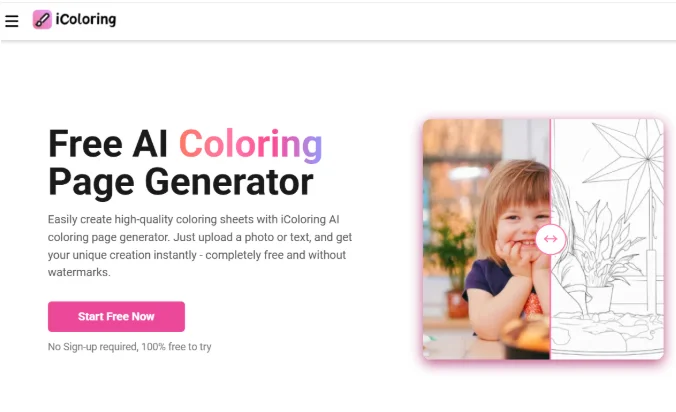
Thanks to accessible AI tools like iColoring, the barrier to entry for creating custom art has vanished. You no longer need to be a master of digital pens to create beautiful outlines. By using an Image to Line Drawing converter, you can transform your personal photo gallery into a limitless library of coloring pages.
The Magic of Personalization
Generic coloring books often feature repetitive patterns that can eventually feel mundane. A custom coloring book, however, carries emotional weight. It tells a story. Whether it’s a collection of “Our First Year Together” for an anniversary or “The Alphabet of Our Pets” for a child, the personal connection makes the coloring experience much more engaging.
Using iColoring allows you to be the curator of your own relaxation. You decide the complexity, the subject matter, and the style.
How AI Has Revolutionized the “Line Art” Process
In the past, creating a coloring page from a photo required hours of manual tracing in software like Adobe Illustrator. For most people, this wasn’t an option.
The breakthrough came with Image to Line Drawing AI. This technology analyzes the “edges” of an object—the places where colors change or shapes end—and translates them into a single black vector or raster line. It ignores the distracting shadows and textures, leaving only the essential skeleton of the image. This is what makes platforms like iColoring so powerful; they make high-level graphic design tasks accessible to everyone for free.
Creative Ideas for Your Custom Book
If you’re looking for inspiration on what to include in your book, consider these unique angles:
- The “Travel Journal” Coloring Book: After a trip, convert your best landscape shots into coloring pages. It’s a great way to “re-live” the vacation while you color in the sights you saw.
- Educational Books for Kids: Take photos of everyday objects—a chair, an apple, a car—and turn them into coloring pages with the words printed underneath. It’s a custom learning tool.
- Pet Portraits: Our furry friends are perfect subjects. The fur textures often translate into beautiful, intricate lines that are very satisfying to color.
- Family History: Scan old black-and-white photos of ancestors and convert them. It’s a wonderful way to connect younger generations with their family tree.
Maximizing the Quality of Your Outlines
To get the most out of your Image to Line Drawing conversion, keep these tips in mind:
- Lighting Matters: Photos with “flat” lighting (no harsh shadows) tend to convert into cleaner lines.
- High Resolution: Use the highest-quality version of your photo. If the photo is blurry, the AI might struggle to find the edges, resulting in “shaky” lines.
- Contrast is King: If a subject blends into the background (like a black cat on a dark sofa), the converter might struggle. Try to use photos where the subject stands out clearly.
The “Free” Advantage
The most impressive part of this process is that it doesn’t require a subscription to expensive design suites. By leveraging iColoring, you are using professional-grade algorithms at no cost. This makes it an ideal project for classrooms, community centers, or budget-conscious gift-givers.
You can combine these free tools with free layout editors like Canva or even specialized “PDF Joiner” websites to merge your converted images into a single file for easy sharing or printing.
Tips for a Professional Finish
Once your pages are converted and printed, you can elevate the “book” feel with a few simple touches:
- The Cover: Use a colored piece of cardstock for the front and back covers.
- Protective Sheets: If you’re using markers, suggest that the user place a “blotter” sheet behind the page they are working on.
- Digital Distribution: If you don’t want to print, you can save your collection as a PDF and share it with friends and family so they can print their favorite pages individually.
Conclusion
A coloring book is more than just paper and ink; it’s an invitation to slow down and focus. By personalizing that experience through iColoring and the magic of Image to Line Drawing technology, you create something truly unique. It’s a blend of your personal memories and the timeless joy of art.

Why I Stopped Typing During Interviews (And What I Do Instead)

AI and the Next Generation: Opportunities, Challenges, and Responsibilities
Your AI Isn’t Wrong, It’s Alone: Why Model Disagreement Is the Real Enterprise Risk