

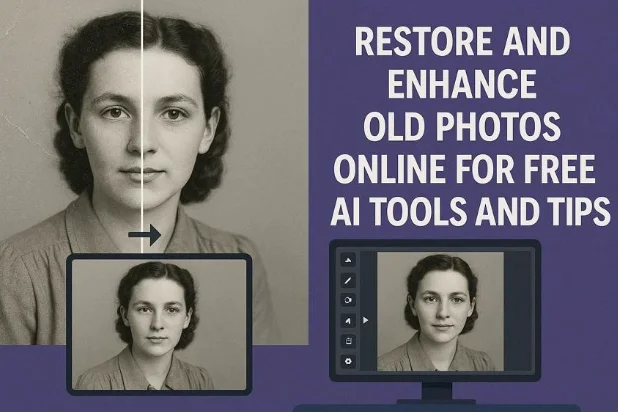
Images are essential to our lives, helping us re-live our memories. However, old photos often suffer from fading, scratches, tears, and discoloration, which can be frustrating. With the evolution of AI, users can now easily restore them and bring them back to life.
Online AI tools address this exact issue by automating the process. This article covers an efficient tool to restore old photos online free, along with its guide. Furthermore, you will also get to know how the restoring tool works in different scenarios.
Part 1. Why Old Photos Fade or Get Damaged Over Time
Before using old photo color restoration online free, it’s important to understand why old photos become damaged over time:
- UV Lights: Ultraviolet rays from sunlight are the main reason for photos being damaged. With constant exposure, images first fade out and then turn greenish.
- Humidity and Moisture: Excessive moisture can trigger chemical reactions that lead to color migration. Sometimes, mold and foxing spots form permanently, resulting in permanent discoloration.
- Temperature Fluctuations: High temperatures accelerate dye degradation and emulsion breakdown, leading to faster fading. Furthermore, freezing temperatures make materials brittle, leading to cracks and flaking.
- Acidic Materials: When images are stored in cheap albums, mats, or backing papers that release acids. Over decades, this causes progressive yellowing, brittleness, and edge erosion.
- Physical Handling: When users frequently touch the images, oil transfers, and bend them can cause tears. Moreover, excessive dust can cause further damage to the images.
Part 2. Best Free Online Photo Restoration Tools: Repairit Online First Choice
Imagine you had stored your grandmother’s black-and-white portrait in a dusty attic album for decades. However, when you open the image, you discover that it is faded and has become yellowish due to humidity. In this situation, we recommend using Repairit Online, which provides an old photo enhancer free. This tool automatically detects and enhances blurry edges, restoring crisp details in low-resolution images.
Users upload their image and choose the desired AI model to start restoring the image. Besides restoration, it lets you colorize the image by enabling the “Old Photo Colorizer” feature. The foremost part is that it also provides your image size and resolution at the top to know its details. Plus, it removes grain and digital noise from the scanned images. This tool can be accessed via it desktop version to access its advanced features anytime.
Key Features
- Detail Recovery: Repairit repairs the underexposed images by enhancing them up to 8x while maintaining their actual quality.
- Portrait Enhancement: It lets you refine facial features and smoother skin texture to get those professional-looking portraits.
- Compare Feature: After repairing the image, this tool shows you the before and after to ensure the accuracy of the outcome.
Detailed Guide on How to Enhance Old Photos with Repairit Online
Now that the functionality is clear, let’s move on to its detailed guide on old photo color restoration online free:
Step 1. Access the AI Enhancement Tool to Insert Images
With the tool running, select the “AI Enhancement” option in the left sidebar, then click “Add Photos” to insert faded images.

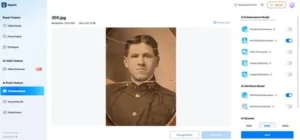
Step 2. Toggle the Desired AI Models to Start Old Photo Restoration
Afterwards, enable the “Portrait Enhancement and Old Photo Restoration” model from the available models. Next, choose the “AI Upscale” to “200%” and click the “Start” button to begin the enhancement process instantly.
Step 3. Preview and Download the Enhanced Image to the Device
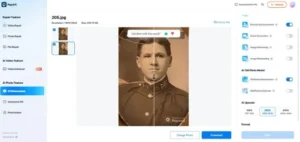
Here, review the before-and-after image to ensure all elements are complete. After previewing the image, hit the “Download” button to render the upscaled image to the device folder.
Part 3. Real-Life Scenarios Solved with Repairit Online: Photos and Videos
To see these solutions in action, let’s look at real-life scenarios where Repairit Online successfully uses the old photo enhancer online free:
Scenario 1. Faded Attic Wedding Portrait
Suppose you have discovered your parents’ vintage wedding photos in the trunk. When you open it, the images are drenched with dust and faded due to moisture. You get heartbroken as a parent’s anniversary is nearby, and you want to frame that image.
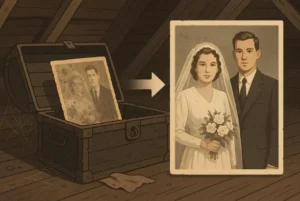
In this situation, Repairit Online is an ideal option that lets you upgrade the image to 4K quality. This efficient tool uses advanced AI models like “Photo Enhancement” to upscale the visuals. Furthermore, you can also enable the “Portrait Enhancement” model to sharpen out the facial features in the wedding portraits.
Scenario 2. Damaged Family Vacation Images and Videos
During a drive cleanup, Mark found old family vacation photos and videos from a 2005 beach trip. However, all the images are blurred and have black patches on them. He wants to reutilize those precious memories of his family members.
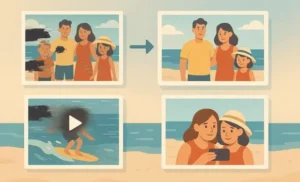
Thus, we recommend using Repairit Online, which restores old photos online free. Users simply upload their black and white images to the tool and select the colorize model to bring the image back to life. Furthermore, it reconstructs missing pixels, balances washed-out skies, and restores skin tones in the portrait. Users can even preview the output to ensure its complete accuracy and completeness.
Scenario 3. Blurry Vintage Portrait Collection
There is a girl who loves collecting antiques to preserve them as memories. One day, she scanned an old image from the museum’s archive using her mobile camera. However, when she opened the image, it was slightly corrupted, which frustrated her. She needs that portrait for her upcoming presentation, which should have a professional quality.
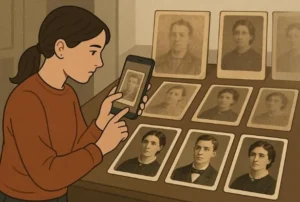
To cater to this scenario, use an online tool like Repairit, which lets you repair unlimited images. It lets you repair multiple images, videos, folders, and even archival files. Furthermore, this tool provides a batch processing feature to process multiple simultaneously.
Scenario 4. Overexposed PSD Wedding Album
A photographer just got free from a wedding shoot located in the northern areas. After coming back home, he opened the image to preview it only to realize his drive had been corrupted. Due to this PSD file crash, the pictures became over-exposed, making them look unreal. At that moment, he panicked because he had to submit this file to the clients in the upcoming week.
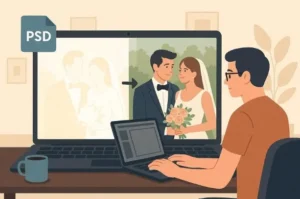
Here, we recommend using Repairit, which provides numerous AI models to enhance the wedding portraits. Furthermore, it also provides you with an image colorization model to balance the colorization feature. Overall, Repairit’s old photo enhancer online free tool is considered a pro-level savior for complex, corrupted creative workflows.
Scenario 5. Lowlight Concert Photos
An amateur freelancer captured a paid concert with his phone. However, the dim stage lighting left dozens of shots dark, noisy, and underexposed, making it an issue for him. As he got paid for this project and has to deliver professional quality images to the music band. He tries basic editing, but it worsens the quality of those pictures.
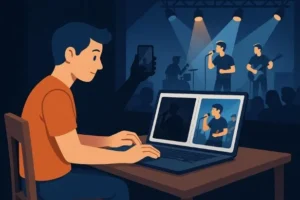
To enhance those low-light pictures, he can opt for an advanced tool like Repairit Online. This efficient tool enhances the images up to 8x quality to make them clear and professional. Plus, he can opt for its “Image Denoising” model to remove any unwanted grain from the picture. Besides this, this tool also offers a repair feature to repair the corrupted images.
Conclusion
Summing up, now users can easily restore old photos online using advanced tools that utilize AI technology. This article covered the main reasons for image fading and an efficient repair tool. Furthermore, we recommend using Repairit Online, which lets you restore old portraits and bring them back to life instantly.

Best DSPM Platforms for AI-Driven Companies in 2026 (Ranked)

Which one is better? Margin Calculator or MTF Calculator?

Make iOS & Android apps with Bolt.new easily