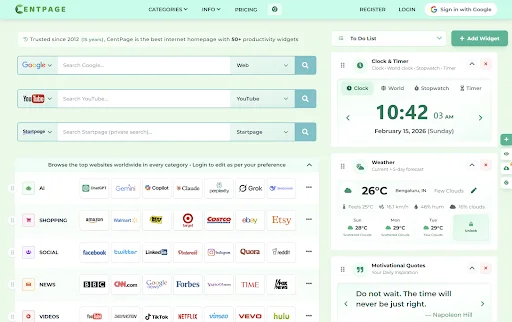
The internet is where most people spend a large portion of their day working, studying, researching, or simply browsing. Yet many users still open a new browser tab and are greeted by a blank Page or a cluttered default homepage. This wastes time and forces you to repeatedly search for the same tools and websites.
A personalized internet homepage solves this problem by turning your browser’s start page into a productivity hub. Instead of navigating through multiple bookmarks and tabs, everything you need appears in one organized dashboard.
In this step by step guide, we’ll explore how to design a personalized internet homepage that helps you stay organized, save time, and boost productivity every time you open a new tab.
Why a Personalized Homepage Matters.
Most browsers come with a very basic default internet homepage that offers little functionality. While bookmarks help store links, they rarely provide a complete system for managing daily tasks and tools.
A personalized homepage improves your browsing experience in several ways:
- Centralized access to your favorite websites
- Faster workflow by reducing unnecessary searches
- Better organization for bookmarks and resources
- Quick access to productivity tools such as notes, calendars, and reminders
Instead of switching between multiple tabs and apps, you can create a workspace directly inside your browser.
Many productivity enthusiasts now use smart start pages like the CentPage Chrome extension to transform the traditional blank tab into a customizable control center.
Define What You Need on Your Homepage.
Before building your homepage, think about what tools and information you access most often during the day.
Different users have different needs:
- Students may need quick access to study websites, notes, and calendars.
- Professionals might want task lists, email shortcuts, and productivity tools.
- Developers may require quick links to documentation, repositories, and utilities.
- Content creators might prefer quick access to YouTube, social platforms, and analytics tools.
Start by making a simple list of:
- Your most visited websites
- Daily tools you use frequently
- Information you check regularly (weather, calendar, news, etc.)
This helps you design a homepage that truly supports your daily workflow instead of becoming another cluttered page.
Organize Your Favorite Websites Visually.
Bookmarks are helpful, but long bookmark lists can become messy very quickly. A well designed homepage solves this by displaying your important links visually.
Instead of searching through folders, you can place your most used websites directly on the start page.
For example, you might create sections such as:
- Work Tools
- Learning Resources
- Social Media
- Research Platforms
- Entertainment Sites
Visual organization helps your brain recognize icons faster than text links. This simple change can save a surprising amount of time throughout the day.
Many modern homepage tools allow you to drag and rearrange links so your most important websites remain easy to access.
Add Productivity Widgets.
A powerful homepage is more than just a collection of links. It should also include widgets that help manage daily activities.
Useful widgets include:
- Sticky Notes for quick reminders
- To Do Lists to track daily tasks
- Calendar for upcoming events
- Weather updates to plan your day
- Focus timers for productivity sessions
When these tools are visible every time you open a new tab, you naturally stay more organized.
Modern start page systems also include advanced widgets like expense trackers, habit trackers, RSS news readers, and even investment tools.
The goal is to turn your homepage into a lightweight command center where essential information is always available.
Customize the Layout for Better Focus.
Design plays an important role in productivity. A messy interface can become distracting, while a clean layout improves concentration.
When designing your homepage, consider:
- Minimal clutter
- Clear widget placement
- Simple visual design
- Fast loading performance
Many productivity dashboards offer Focus Mode for distraction-free work and Dashboard Mode for a complete overview of tools.
Customization options often include:
- Changing widget positions
- Resizing panels
- Selecting themes or background styles
- Choosing which tools appear on the page
Platforms like the new tab extension showcase how a well designed start page can combine powerful tools with a clean interface.
A well organized layout ensures that your homepage supports productivity rather than interrupting it.
Integrate Helpful Tools and Utilities.
One of the biggest advantages of a personalized homepage is the ability to integrate many small tools into a single space.
Instead of searching for separate websites, you can add built-in utilities such as:
- Unit converters
- Password generators
- Internet speed tests
- Language translators
- Typing speed tests
- Calculator tools
These tools save time because you don’t have to leave your current page to access them.
For example, productivity dashboards like CentPage include 50+ widgets covering categories such as:
- Productivity and organization
- Finance and investments
- Learning and information
- Health and wellness
- Utilities and development tools
- News and entertainment
Having these features directly on your homepage turns your browser into a personal operating system for daily tasks.
Keep Improving Your Homepage Over Time.
Your workflow evolves over time, and your homepage should evolve with it.
Every few weeks, review your setup and ask yourself:
- Which tools do I use the most?
- Which widgets are unnecessary?
- Are my most important websites easy to access?
Removing unused elements keeps your homepage clean and efficient.
You can also experiment with new widgets or features to discover tools that improve your productivity.
Many modern platforms release updates frequently, adding new capabilities and improvements. Staying connected with the community can help you learn about these features.
For example, you can Follow CentPage on Twitter to stay updated on new widgets, productivity tips, and feature releases.
Final Thoughts.
A personalized internet homepage may seem like a small improvement, but it can significantly impact your daily productivity. Instead of wasting time navigating through bookmarks and searching for tools, everything you need appears the moment you open a new tab.
By organizing your favorite websites, adding useful widgets, and designing a clean layout, you can transform your browser into a powerful workspace.
The key is simplicity and relevance only include tools that genuinely help you stay organized and focused.
When done correctly, your homepage becomes more than just a starting point for browsing. It becomes a smart productivity dashboard that helps you manage work, learning, and daily life more efficiently.
Watch the official CentPage promo video
https://www.youtube.com/watch?v=7Jzyk9Pm0sk

5 AI Tools That Are Actually Worth Paying For in 2026 — Tested for Small Business

How Residential Proxies Help Scale Social Media Campaigns Safely

uKnowva vs Zoho People vs Darwinbox: Best HRMS Software in India