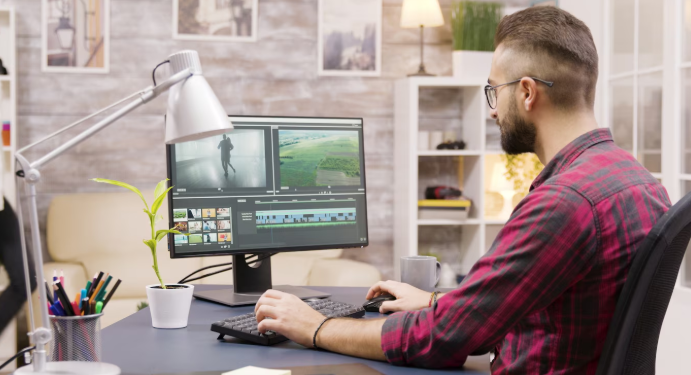
In today’s world, selling a house or product online is all about showing it in the best way. People want to see clear and interesting pictures or videos before they decide to buy or visit. That is why using a good real estate video editor is very important. It helps turn simple videos into eye-catching tours that attract more viewers. Along with videos, using software like virtual staging software can make empty spaces look full and welcoming. This article will explain how these tools help make listings much better and easier to sell.
Why Videos Are Important for Listings
Videos catch attention much better than photos alone. When someone watches a video, they can see the place or product from different angles. They get a real feel for the size and style. This helps buyers or renters imagine themselves in the space. Listings with videos usually get more views and sell faster than those without.
Types of Videos to Use
- Walkthrough Videos: These show a full tour of the home or product, as if the viewer is walking through it in person.
- Drone Videos: Aerial shots show the outside and the neighbourhood around the property.
- 3D Virtual Tours: These let viewers control where to look, giving an interactive experience.
- Testimonial Videos: Happy customers share their thoughts, building trust.
What Is a Real Estate Video Editor?
A real estate video editor is a tool or software that helps you improve and polish your videos. It allows you to cut out boring parts, fix shaky footage, add text, and make the video look more professional. Some editors even let you add music or voice-overs to explain features.
Benefits of Using a Video Editor
- Better Quality: Fix problems like bad lighting or shaky camera work.
- Add Details: Use text to highlight important points like price or special features.
- Create a Story: Make your video flow smoothly so it keeps people interested.
Popular Video Editors
There are many easy-to-use video editors available, such as iMovie, Filmora, and Adobe Premiere Pro. You don’t need to be an expert to use them, but even basic editing can make a big difference. And if you’re using Premiere Pro, this guide on creating video proxies can help you work faster with large, high-resolution files.
What Is Virtual Staging Software?
Empty rooms can feel cold and hard to picture as a home. This is where virtual staging software comes in. It lets you add furniture, decorations, and colours to photos or videos without moving anything in real life. It’s a smart and affordable way to make a space look warm and inviting.
Why Use Virtual Staging?
- Save Money: No need to rent or buy furniture.
- Try Different Styles: You can easily change colours or furniture to match what buyers like.
- Help Buyers Imagine Living There: Staged rooms look lived-in and comfortable, which attracts buyers.
Popular Virtual Staging Software
Some popular virtual staging tools include BoxBrownie, Homestyler, and RoOomy. These programs are user-friendly and allow you to create great-looking rooms quickly.
How Video Editors and Virtual Staging Work Together
When you combine videos edited by a real estate video editor with virtual staging, you get a powerful tool to sell listings faster. Imagine a video that shows a room changing from empty to fully furnished, helping viewers see the full potential. This combination makes listings stand out and keeps viewers interested.
Making Staged Walkthrough Videos
- First, record clear video clips of the empty rooms.
- Use virtual staging software to add furniture and decorations to those rooms.
- Then, use a video editor to put everything together smoothly.
- Add text, music, or voice explanations to guide viewers.
This process makes your listing much more attractive and easier for buyers to understand.
Tips for Creating Great Listing Videos
- Keep It Short: Aim for 1 to 3 minutes to keep viewers interested.
- Use Good Lighting: Make sure rooms look bright and clean.
- Make It Mobile-Friendly: Many people watch videos on phones, so make sure your video looks good on small screens.
- Add Contact Info: Always include how viewers can reach you.
Common Mistakes to Avoid
- Too Much Editing: Avoid overdoing effects that make the video look fake.
- Unrealistic Staging: Don’t stage rooms with furniture that doesn’t fit or look odd.
- Poor Sound or Lighting: Bad audio or dark rooms will turn viewers away.
Future of Video and Staging
New technology like artificial intelligence (AI) and augmented reality (AR) will soon make these tools even better. AI can help edit videos automatically, while AR can let buyers change furniture styles themselves during virtual tours. These advancements will make listings more interactive and exciting.
Final Thoughts
Using a real estate video editor along with virtual staging software is a smart way to make your listings more attractive and effective. Videos help buyers see and feel the space, while virtual staging helps them imagine living there. Together, they increase interest and can help you sell faster. If you want your listing to stand out, these tools are a must-have in today’s market.

How Technology is Changing the Way Children Learn — and Why That Matters

What Are the Best Small Hearing Aids for First-Time Buyers?
Optimize Team Scheduling with WiFi Time Clock Tracking