Stable Diffusion Logo Corrector: Complete Guide for Designers and Marketers
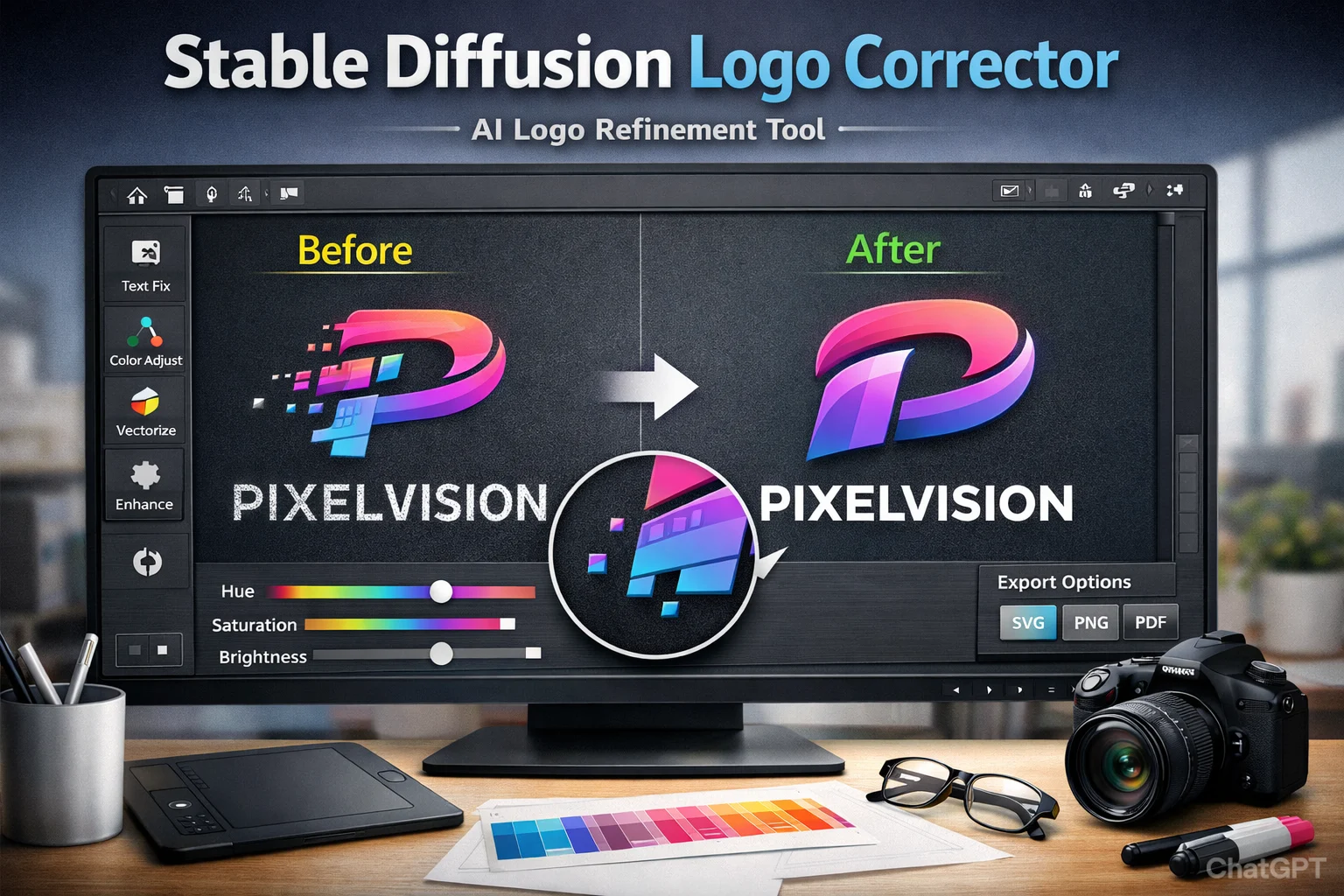
Artificial intelligence has transformed the way businesses create visual identities. Tools like Stable Diffusion allow users to generate creative logo concepts in seconds. However, AI-generated logos often require refinement before they are ready for professional use. This is where a Stable Diffusion logo corrector becomes essential.
A logo corrector helps refine AI-generated designs by improving typography, adjusting colors, fixing distortions, and converting files into scalable formats. For startups, designers, and marketing teams, this tool bridges the gap between AI creativity and brand-ready quality.
What Is a Stable Diffusion Logo Corrector?
A Stable Diffusion logo corrector is a post-processing tool or workflow designed to enhance logos created using AI image-generation models. While Stable Diffusion produces impressive visuals, logos may contain:
- Distorted or unreadable text
- Uneven spacing and alignment
- Inconsistent brand colors
- Blurry or pixelated edges
- Non-vector formats unsuitable for printing
The corrector refines these elements to ensure the logo meets professional branding standards.
See also Unlocking Innovation: How an AI Software Development Service Can Transform Your Business
Why Businesses Use Logo Correction Tools
AI logo generation is fast, but raw outputs are rarely perfect. Using a logo correction solution provides several advantages:
1. Improved Design Quality
Enhances clarity, sharpness, and structure for a polished finish.
2. Brand Consistency
Aligns fonts, colors, and spacing with defined brand guidelines.
3. Time Efficiency
Reduces hours of manual editing in traditional design software.
4. Scalability
Converts raster images into vector formats for print, web, and merchandise.
5. Cost-Effective Branding
Allows startups to create professional assets without hiring large design teams.
By correcting imperfections, businesses can confidently use AI-generated logos across digital and offline platforms.
Key Features of a Stable Diffusion Logo Corrector
Modern logo refinement tools offer a range of practical features:
Text and Typography Correction
Fixes distorted lettering and improves font alignment.
Color Calibration
Adjusts saturation, contrast, and brand color accuracy.
Edge Sharpening and Cleanup
Removes noise and enhances visual clarity.
Vector Conversion
Exports scalable files (SVG, EPS, PDF) for professional printing.
Software Compatibility
Works seamlessly with design platforms such as Adobe Photoshop and Illustrator.
These features ensure logos are usable across websites, social media, packaging, and advertising campaigns.
How It Fits Into a Professional Workflow
Designers and marketers can integrate logo correction into their workflow in the following way:
- Generate initial concepts using Stable Diffusion.
- Select the strongest variation based on brand identity.
- Use a logo correction tool to fix structural issues.
- Convert the file into a vector format.
- Test across digital and print platforms.
This streamlined process combines AI speed with professional precision.
See also Crushon AI: Complete Guide to Features, Safety, Pricing, and Real User Experience (2026)
Applications Across Industries
A Stable Diffusion logo corrector is useful in multiple industries:
Startups
Quickly develop affordable branding assets during early business stages.
E-commerce Brands
Refine AI-generated logos for product packaging and online stores.
Marketing Agencies
Produce campaign visuals faster while maintaining quality standards.
Freelance Designers
Enhance productivity by combining AI generation with professional editing.
Content Creators
Build polished personal branding for YouTube, blogs, and social media platforms.
Best Practices for Best Results
To maximize effectiveness, follow these expert recommendations:
- Define brand guidelines before making corrections.
- Use high-resolution AI outputs for better refinement quality.
- Always export vector formats for scalability.
- Verify color accuracy in both RGB and CMYK formats.
- Gather audience feedback before finalizing the design.
Following these steps ensures professional and commercially viable results.
Common Mistakes to Avoid
Even with correction tools, some issues can persist:
- Over-editing and losing the original creative concept
- Ignoring brand consistency
- Skipping vector conversion
- Using low-resolution source files
- Not testing logo visibility on dark and light backgrounds
Avoiding these mistakes improves long-term branding impact.
Frequently Asked Questions (FAQs)
What is the purpose of a Stable Diffusion logo corrector?
It refines AI-generated logos by fixing design inconsistencies and preparing them for professional use.
Can it fix distorted AI-generated text?
Yes, typography correction is one of its primary functions.
Is it beginner-friendly?
Most tools offer simple interfaces suitable for non-designers.
Does it support vector exports?
Yes, scalable formats like SVG and EPS are commonly supported.
Are corrected AI logos suitable for commercial use?
Once refined and properly formatted, they can meet professional branding standards.
The Future of AI Logo Refinement
As AI design technology evolves, refinement tools will become even more advanced. We can expect improved typography accuracy, smarter color matching, and automatic vectorization. Rather than replacing designers, these tools enhance creativity and productivity.
Businesses that adopt AI-assisted workflows gain a competitive advantage through faster branding development and reduced production costs.
Conclusion
The Stable Diffusion logo corrector is a powerful solution for transforming AI-generated concepts into professional brand assets. While Stable Diffusion excels at creativity, its outputs often require polishing. A structured correction process ensures logos are clean, scalable, and aligned with brand identity.
For designers, startups, and marketing teams, combining AI generation with logo refinement tools offers the perfect balance of speed and quality. As AI-driven branding continues to grow, mastering logo correction techniques will become an essential skill in modern digital design.

AI and the Next Generation: Opportunities, Challenges, and Responsibilities

Your AI Isn’t Wrong, It’s Alone: Why Model Disagreement Is the Real Enterprise Risk
SEO for ChatGPT: Boost Your Brand in AI Responses