If you are tired of juggling multiple remotes for your TV, cable box, Blu‑ray player, and sound system, the logitech harmony 650 offers a smarter solution. This universal remote brings all your entertainment controls together in one device with intuitive activities like “Watch TV” or “Watch Movie”. It was once one of the most popular universal remotes on the market and still is used by many people today. In this article, we will explore what it is, how it works, its features, setup process, pros and cons, common issues, and whether it is still worthy in 2026.
What Is Logitech Harmony 650?
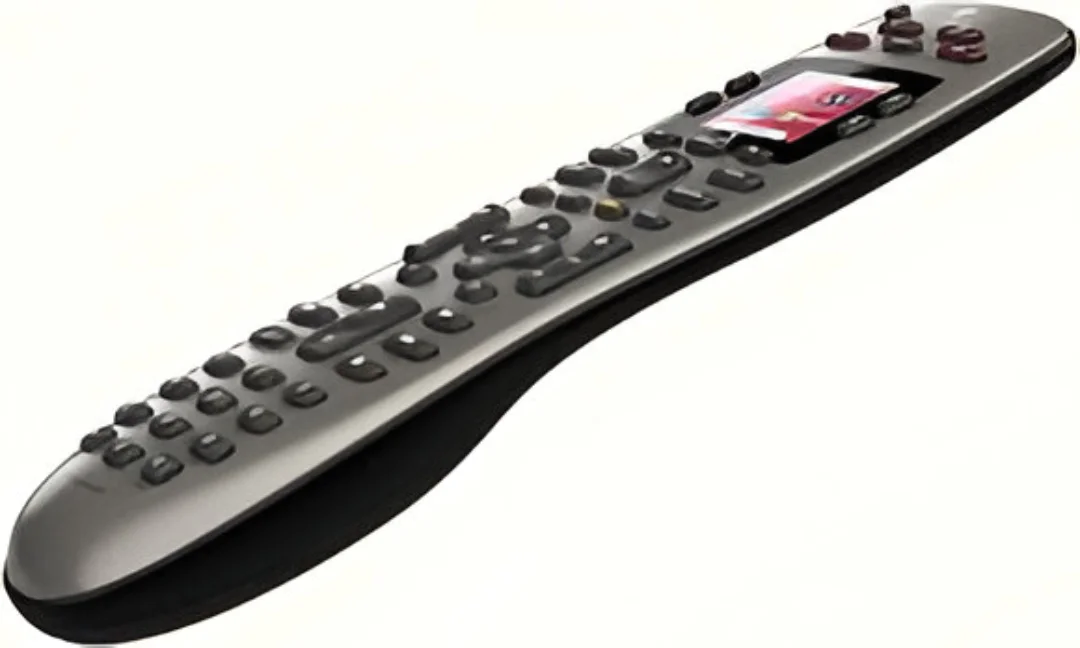
The logitech harmony 650 is a universal infrared (IR) remote control designed to replace multiple remotes in your home theater setup. Instead of using separate remotes for each device (TV, media player, sound system), this one remote can control all of them. It does this by sending IR signals — the same ones your original remotes use — to each device. It is programmed using Logitech’s MyHarmony software on a computer, which walks you through entering your device details and creating easy‑to‑use activities.
This remote stands out because of its color display, activity‑based controls, and compatibility with thousands of device brands and models. Activity buttons like “Watch TV”, “Watch Movie”, and “Listen to Music” instantly perform a set of actions — like powering on devices and switching inputs — making your entertainment smoother.
Key Features of Logitech Harmony 650
Activity‑Based Automation
One of the best features of the Harmony 650 is the activity system. When you press an activity button like “Watch TV”, the remote turns on all required devices and sets the correct inputs with one command. This replaces the need to switch inputs or turn on devices individually.
Device Compatibility
The Harmony 650 can control multiple devices — often up to 8 devices — including TVs, DVD/Blu‑ray players, AV receivers, and streaming boxes. It uses a huge online database of device codes to simplify setup.
Color LCD Screen
The remote features a color LCD screen that adapts to your activities. The screen shows context‑specific buttons — so when you are watching a movie, it shows playback controls instead of channel buttons.
Infrared (IR) Technology
The Harmony 650 uses standard IR signals for device communication, so it works with almost any device that has an IR receiver. However, it does not support Bluetooth or Wi‑Fi devices out of the box.
Software‑Guided Setup
The setup process is done via Logitech’s MyHarmony software on a computer. You add devices by entering their model numbers, create activities, and then sync the settings to the remote via USB.
Backlit Buttons and Intuitive Layout
The remote’s buttons light up in the dark, and the layout is designed for everyday use. Even users unfamiliar with smart remotes should find it easy to navigate.
How to Set Up Logitech Harmony 650
Setting up a universal remote can feel intimidating, but the Harmony 650’s guided process makes it manageable:
- Download MyHarmony Software: Visit Logitech’s official site and install MyHarmony on your Windows or Mac computer.
- Connect the Remote: Insert AA batteries in the Harmony 650 and connect it to the computer with the supplied USB cable.
- Add Devices: Enter each device’s brand and model (TV, cable box, receiver, etc.). The software will fetch the required codes.
- Create Activities: Build activities like “Watch TV” or “Watch Movie” by selecting which devices are involved and what actions they should take.
- Sync the Remote: Once setup is complete, sync the settings to the Harmony 650. Your remote now controls all included devices.
This activity‑based setup means you rarely need more than one or two button presses to control your entire entertainment stack.
Compatibility and Device Support
The Harmony 650 works with most IR controlled devices — which is most TVs, media players, and audio receivers. The MyHarmony software includes an extensive device code database, so chances are your TV or equipment is supported.
However, because it uses IR only, it has limitations with newer devices that rely on Bluetooth or Wi‑Fi. For example, modern gaming consoles or smart TVs that use non‑IR control might not work unless they have IR support. Users have reported issues trying to pair the Harmony 650 with newer TVs or streaming devices that do not rely on IR.
This means that while it remains useful for many setups, it may not control every modern smart gadget without additional hardware like IR blasters or hubs.
Pros and Cons
Here’s a balanced look at the Harmony 650’s strong points and limitations:
Advantages
- Controls multiple devices with one remote — major convenience.
- Activity automation simplifies entertainment control.
- Color LCD and backlit buttons improve usability.
- Large device database.
- Affordable compared to other advanced universal remotes.
Limitations
- Requires computer for initial setup.
- No Wi‑Fi or Bluetooth support.
- Battery life and button size have mixed reviews.
- Software and support may be limited as Logitech phases out Harmony remotes.
Overall, the Harmony 650 offers a practical way to control multiple entertainment devices — but its usefulness depends on your system and how modern your devices are.
Common Issues & Troubleshooting
Even the most popular tech products have quirks, and the Harmony 650 is no exception. Below are some problems users have shared and possible workarounds:
Setup Software Freezing
Some users report that the MyHarmony software may freeze when creating activities or adding devices. This can be due to outdated software or compatibility issues. Trying different operating system compatibility settings or reinstalling the software sometimes helps.
Device Not Responding to Commands
Sometimes the remote registers button presses but the device does not respond. This could be due to blocked IR signals, incorrect code assignments, or a need to re‑sync the remote.
Discontinued Official Support
Logitech has phased out support for some Harmony remotes, which means the ability to reconfigure or update may be limited. However, many users report that the remotes still function with current settings.
Compatibility with Modern Devices
Newer smart TVs and devices that use Bluetooth or Wi‑Fi may not work with the IR‑only Harmony 650 unless additional IR technology is integrated.
While these issues can be frustrating, many users find workarounds or get long‑term service from their remotes with minimal problems.
Logitech Harmony 650 vs Other Universal Remotes
Compared to other Harmony models (like Harmony Elite or Companion), the 650 is simpler and generally less expensive. It lacks some advanced features like hub connectivity or app‑based control, but it still handles basic and intermediate setups effectively. Models with a Harmony Hub can control smart home devices, Wi‑Fi equipment, and Bluetooth devices — something the Harmony 650 cannot do on its own.
For basic TV, receiver, and media player setups, the Harmony 650 remains a strong choice. But if you want smart home integration or mobile app control, a hub‑based model is a better long‑term investment.
Is Logitech Harmony 650 Worth Buying in 2026?
Whether the logitech harmony 650 is worth it in 2026 depends on your needs. If you have a traditional entertainment system made up of IR devices and want to simplify control, it remains a cost‑effective solution. Many users still find its activity‑based approach superior to managing several remotes.
However, if most of your devices rely on Bluetooth, Wi‑Fi, or apps for control, the Harmony 650 may struggle. Additionally, as Logitech phases out support for older Harmony remotes, future updates could be limited, though existing configurations usually continue to work.
In summary, for classic home theater setups, the Harmony 650 still makes sense. For modern connected home systems, consider a hub‑based remote or another smart control platform.
Conclusion
The logitech harmony 650 was once a leading universal remote, and it still holds value for many users who want one controller for multiple entertainment devices. It offers a robust device database, activity‑based automation, and a user‑friendly setup process. While it may not be perfect and has limitations with new technology, it continues to be a useful tool for simplifying home entertainment control. Whether you are looking to replace a pile of remotes or centralize your system, the Harmony 650 delivers a solid experience at a relatively affordable price.
5 AI Tools That Are Actually Worth Paying For in 2026 — Tested for Small Business

How Residential Proxies Help Scale Social Media Campaigns Safely

uKnowva vs Zoho People vs Darwinbox: Best HRMS Software in India