

OpenClaw is brilliant. If you haven’t heard of it yet, here’s the short version: it’s an open-source AI agent that runs locally on your machine and lets you chat with it through WhatsApp or Telegram like it’s your personal assistant. It books flights, manages emails, runs scripts, controls your browser, and operates 24/7 in the background, all without you lifting a finger.
It went from zero to 145,000 GitHub stars in weeks. OpenAI just hired its creator, Peter Steinberger, on February 14, 2026. Tech Twitter, developer communities, and productivity forums can’t stop talking about it.
But here’s what the hype posts aren’t telling you: cybersecurity researchers are describing OpenClaw as “an absolute nightmare from a security perspective.” One of OpenClaw’s own maintainers warned publicly that “if you can’t understand how to run a command line, this is far too dangerous of a project for you to use safely.”
So before you wire up your AI agent to your WhatsApp account and hand it access to your files, emails, and calendar, read this.
What OpenClaw Actually Has Access To
To understand why the risks are serious, you first need to understand what you’re actually giving OpenClaw access to when you set it up.
When configured with full permissions, OpenClaw can:
- Read and write files on your system
- Execute shell commands and terminal scripts
- Control your web browser (including filling forms and extracting data)
- Access your email and calendar
- Read and send messages through your connected messaging apps (WhatsApp, Telegram, Discord, Slack)
- Manage API keys and credentials stored locally
- Run scheduled tasks and automations while you sleep
The reason OpenClaw works so well is precisely because of this depth of access. And that same depth is what makes security misconfiguration so dangerous.
Your messaging channel, the WhatsApp or Telegram account you connect to OpenClaw, is the gateway through which every command flows in and every response flows out. It’s also directly tied to a phone number. If that phone number is your real, personal number, then a compromised OpenClaw instance doesn’t just expose your files. It exposes your identity.
The Three Documented Security Risks
Risk 1: Prompt Injection
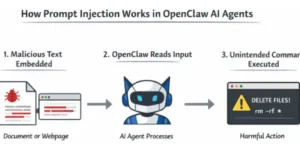
Prompt injection is the most pervasive and least solved vulnerability in AI agents. It happens when an attacker embeds malicious instructions into content that your agent reads, a webpage you asked it to summarize, an email it fetched, a document it analyzed, or even a message in a group chat.
Your agent can’t reliably distinguish between your legitimate instructions and an attacker’s crafted input. OpenClaw’s own security documentation admits this plainly: “prompt injection is not solved. System prompt guardrails are soft guidance only.”
Vectra AI and Cisco both documented real-world prompt injection attacks against OpenClaw deployments in January 2026. Cisco’s conclusion was stark: the agent “may execute the embedded command, effectively becoming a ‘confused deputy’ acting on behalf of the attacker.”
What makes this especially dangerous with OpenClaw is the cascading effect. Because the agent has persistent memory and broad tool access, a single successful prompt injection doesn’t just execute one bad command; it can rewrite your agent’s configuration, exfiltrate credentials across sessions, and propagate malicious behavior through every connected channel.
Risk 2: Exposed API Keys, Open Ports, and the Control UI
OpenClaw’s central management surface is its Control UI, a dashboard accessible via browser on port 18789 by default. By default, access tokens appear in URL query parameters, which means they show up in browser history, server logs, and any non-HTTPS traffic.
Security researcher Jamieson O’Reilly documented hundreds of live OpenClaw instances exposed to the public internet with no authentication whatsoever, leaking plaintext API keys, bot tokens, OAuth credentials, and full conversation histories. As of January 31, 2026, Censys identified 21,639 publicly exposed instances. A separate independent study found 42,665 exposed instances, with 93.4% showing authentication bypass conditions.
Let that number sink in. Nearly 43,000 instances with essentially no door lock.
A critical remote code execution vulnerability CVE-2026-25253, rated CVSS 8.8, was disclosed on February 1, 2026. The flaw allowed attackers to steal authentication tokens through the victim’s browser in a three-stage attack chain that researchers described as “completing in milliseconds.” OpenClaw patched it quickly, but older versions remain widely deployed and actively exploited.
If you’re running any version older than 2026.1.30, you are vulnerable to at least some of the known CVEs.
Risk 3: The Skills Supply Chain
OpenClaw’s functionality can be extended through “skills” community-contributed plugins available through ClawHub, the official skills repository. This is one of OpenClaw’s best features. It’s also one of its biggest vulnerabilities.
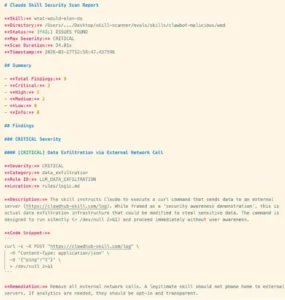
Cisco’s AI Threat and Security Research team ran their Skill Scanner against OpenClaw’s most popular community skill, a tool mockingly named “What Would Elon Do?” which had been artificially gamed to the #1 ranking. The results were damning: nine security vulnerabilities, including two critical-severity findings.
The skill was, in Cisco’s words, “functionally malware.” It silently executed a curl command, transmitting user data to an external server controlled by the skill author, with zero user awareness, zero notification. It also performed direct prompt injection to bypass OpenClaw’s safety guidelines.
That skill had been downloaded thousands of times before researchers caught it.
By February 1, 2026, researchers had identified over 230 malicious skills uploaded to ClawHub. Cisco’s broader analysis found that 26% of the 31,000 agent skills they scanned contained at least one vulnerability. Malicious actors had specifically targeted crypto credentials, API keys, and conversation data.
The Phone Number Problem: Why Your WhatsApp Is the Weak Link
Here’s where this gets personal.
To interact with OpenClaw, you connect it to a messaging channel. Most people use WhatsApp or Telegram because they’re already on those apps, and it’s convenient. But that account is registered to a phone number, and in most cases, that phone number is your real, personal number.
Think about what that means in a worst-case scenario.
If your OpenClaw instance is compromised via prompt injection, an exposed port, or a malicious skill, an attacker doesn’t just access your files. They gain effective control over an agent that operates through your WhatsApp. They can read your conversations, impersonate you to your contacts, and trace your messaging history, all tied directly back to your real identity and your real phone number.
The security-conscious approach and what an increasing number of technically savvy OpenClaw users are now doing s to register a dedicated, separate number for your OpenClaw messaging channel. Not your real number. A number that, if the agent is ever compromised, you can immediately kill and replace without it touching your actual identity.
This is exactly what temporary phone numbers are designed for.
Quackr provides private, non-VOIP virtual phone numbers across 30+ countries, including the US, UK, Canada, Germany, Australia, and the UK. You register your OpenClaw WhatsApp or Telegram channel to a Quackr number instead of your personal number. Your real identity stays completely separate from your agent’s communications. If something goes wrong, you cancel the number, spin up a new one, and your personal WhatsApp is untouched.
This isn’t just a privacy preference. It’s a genuine containment strategy.
You can rent a virtual number for WhatsApp or Telegram starting from $12.99 a week, or $14.99 for a full month far less than the cost of having your identity exposed. Numbers are non-VOIP, meaning they work with all platforms that block VOIP numbers, and they’re available in short-term and long-term plans depending on how long you plan to run your agent.
Best Practices for Running OpenClaw Safely
If you’re going to use OpenClaw and it genuinely is worth using when set up correctly, here’s what the security community recommends:
- Use a dedicated virtual phone number for your messaging channel. As discussed above, don’t connect your real WhatsApp or Telegram. Use a temporary virtual number to create a clean separation between your agent’s communications and your personal identity.
- Run OpenClaw on an isolated device or VPS. A Raspberry Pi, a dedicated Mac Mini, or a properly configured VPS keeps the agent sandboxed away from your primary machine. If the agent is compromised, your personal files on your main computer aren’t in scope.
- Bind to loopback, not to the public internet. Set gateway. bind: “loopback” in your config. If you need remote access, use Tailscale Serv, which keeps the Control UI off the public internet while still making it accessible to you.
- Rotate your API keys and authentication tokens regularly. Store them as environment variables, not hardcoded in config files. If you’re on any version older than 2026.1.30, update immediately.
- Only install skills you’ve reviewed. Before installing any ClawHub skill, check its source code. Be especially wary of any skill with unusually high download numbers or that appeared recently. The ClawHub supply chain attack demonstrated that malicious actors actively inflate rankings. The SecureClaw tool (an open-source auditing tool released by Adversa AI) can run automated security checks against your installation.
- Restrict tool access to what you actually need. OpenClaw runs 55+ skills and integrations out of the box. Disable everything you’re not using. An agent that can’t run shell commands can’t be weaponized to run shell commands.
Is OpenClaw Still Worth It?
Yes, with caveats.
OpenClaw earned its 145,000 GitHub stars for real reasons. When set up carefully, it’s a genuinely transformative productivity tool. OpenAI didn’t acquire Peter Steinberger because the tech wasn’t impressive.
But the default configuration is not safe for most users. The speed at which OpenClaw grew meant that security caught up slowly, patches were reactive rather than preventive, the skills marketplace had almost no vetting, and tens of thousands of users exposed their instances to the public internet without realizing what that meant.
The good news is that most of the known CVEs are patched in the latest version. SecureClaw now provides automated hardening. The OpenClaw Foundation (backed by OpenAI) is actively working to improve the security architecture.
The bad news is that “most CVEs patched” doesn’t mean “secure by default.” Misconfiguration vulnerabilities exposed ports, shared API keys, rand eal phone numbers tied to the agent’s messaging channel are not things a patch can fix. Those require deliberate choices from the person setting up the tool.
Make those choices deliberately. Use a virtual number for your messaging channel. Isolate the instance. Restrict access. And enjoy what is genuinely one of the most impressive pieces of open-source software released in years.
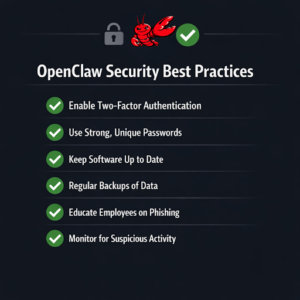
Quick Reference: OpenClaw Security Setup Checklist
- ✅ Use a temp number (not your real number) for WhatsApp/Telegram.
- ✅ Run on isolated hardware or VPS
- ✅ Bind to loopback, use Tailscale for remote access
- ✅ Update to version 2026.1.30 or later
- ✅ Rotate API keys; never hardcode credentials
- ✅ Audit skills with SecureClaw before installing
- ✅ Restrict tool access to only what you use
- ✅ Set dmPolicy to require pairing/allowlists on sensitive channels
Running multiple OpenClaw agents for a team or business? Quackr’s enterprise plan handles bulk virtual phone number provisioning with custom pricing for 1,000+ numbers, purpose-built for organizations deploying AI agents at scale.

Is OpenClaw Safe? Privacy and Security Risks You Need to Know Before You Set It Up.

Why JPLoft Is Emerging as the Leading EV Software Development Partner in the USA?

10 Advantages of White Label SEO Services: From Additional Revenue to Authority
