
It’s 7:45 AM on a Tuesday. You’re answering work emails while simultaneously trying to remember whether your daughter’s soccer practice was moved to Thursday or if that’s when your quarterly review is scheduled. Your partner texts asking about the dentist appointment, and somewhere in the back of your mind, you know a birthday is coming up — but whose? Sound familiar?
For millions of busy professionals and parents, this daily mental juggling act isn’t just exhausting — it’s unsustainable. Scattered sticky notes, overlapping calendar apps, and missed commitments create a constant undercurrent of stress that chips away at productivity and peace of mind.
Enter the digital family calendar display: a centralized, always-visible scheduling hub designed to bring every commitment, deadline, and family activity into one unified view. More than just a planning tool, it’s a foundation for stress-free organization and stronger self-discipline habits. Whether you’re concerned about committing to new technology or simply need a smarter system, this article will walk you through everything — from core features and real-world benefits to building lasting routines and taking advantage of flexible 180-day return policies that make the switch completely risk-free.
What is a Digital Family Calendar Display?
A digital family calendar display is a centralized, interactive scheduling hub that consolidates every commitment — from school pickups and work deadlines to gym sessions and birthday reminders — into a single, always-visible interface. Unlike a basic phone calendar or a paper planner tucked in a drawer, this type of display is designed to be seen by everyone who needs it, functioning as a shared command center for household or team coordination.
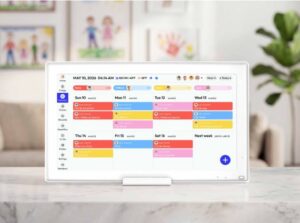
At its core, the technology relies on cloud synchronization, meaning any update made from a phone, tablet, or computer reflects instantly across all connected devices. Multi-user access allows each family member or colleague to maintain their own color-coded schedule within the same view, making it immediately clear whose commitments belong to whom — and where conflicts might arise before they become problems. Integration with popular platforms like Google Calendar, Apple Calendar, and Microsoft Outlook means you’re not starting from scratch; your existing data flows directly in.
Compare this to a traditional wall calendar: static, single-user, and incapable of sending a reminder when you’re stuck in traffic. Even basic digital calendars on smartphones fall short when information stays siloed on one person’s device. A dedicated digital family calendar display bridges that gap, transforming passive scheduling into active, collaborative organization. Platforms like Everblog have built their digital calendar solutions around exactly this principle — making shared visibility the default rather than an afterthought. For busy professionals managing both a career and a household, it’s less of a gadget and more of an essential infrastructure upgrade.
Achieving Stress-Free Organization for Busy Professionals
The average professional carries an invisible cognitive load — mentally tracking dozens of commitments across work and home simultaneously. This constant background processing doesn’t just drain energy; it creates the kind of low-grade anxiety that makes it harder to focus on what’s actually in front of you. A digital family calendar display directly addresses this by externalizing that mental burden into a visible, reliable system.

Centralizing appointments, deadlines, and activities into one shared view eliminates the fragmentation that causes stress in the first place. Instead of cross-referencing a work Outlook calendar with a personal Google Calendar and a partner’s phone, everything lives in one place. Automated reminders mean you’re not relying on memory to flag an upcoming performance review or a school pickup time change — the system does that work for you. Double-booking becomes nearly impossible when overlapping commitments are flagged in real time before they’re confirmed.
For professionals managing both career responsibilities and household logistics, the integration of work and personal life within a single view is particularly valuable. Color-coding by category — work, kids, health, finances — gives an immediate visual read on how your week is weighted, making it easier to spot overload before it arrives. This kind of proactive visibility is what transforms scheduling from a reactive scramble into genuine stress-free organization.
Real-Life Application: Streamlining a Busy Professional’s Week
Consider a working parent whose Monday starts with a color-coded weekly overview: blue for work meetings, green for school events, orange for personal appointments. A conflict between Wednesday’s client call and a pediatrician appointment surfaces immediately — days before either is missed. A quick reschedule, a shared update visible to their partner instantly, and the week proceeds without friction. That’s not a best-case scenario; it’s what consistent use of a centralized digital calendar makes routine.
Building Self-Discipline Habits with Your Digital Calendar
Self-discipline isn’t a personality trait — it’s a system. And like any system, it works best when it’s built on consistent, repeatable structures. A digital family calendar display does more than track appointments; it creates the scaffolding that supports lasting behavioral change. When your schedule is visible, intentional, and tied to recurring patterns, the discipline to follow through becomes significantly easier to maintain.
Recurring events are one of the most underutilized features for habit formation. Scheduling a daily 30-minute planning block, a weekly family check-in, or a monthly financial review transforms these activities from good intentions into fixed commitments. Seeing them appear on the display week after week reinforces their importance — and the visual reminder alone reduces the friction that causes most habits to break down. Over time, these recurring anchors become the backbone of a structured routine rather than tasks you have to consciously remember to initiate.
Goal tracking takes this further. Many digital calendar platforms allow you to attach notes, checklists, or progress markers to events, turning the calendar into a lightweight accountability tool. Want to exercise three times a week? Block those sessions, then review at the end of the week whether they happened. That honest, low-pressure audit — visible in your own calendar history — builds the self-awareness that genuine self-discipline requires. Sharing selected goals with a partner or colleague adds a layer of social accountability without requiring a separate app or system.
The real power is in consistency. When the calendar becomes the single source of truth for how you spend your time, it stops being a passive record and starts functioning as an active guide — one that reflects your priorities and holds you to them, day after day.
Peace of Mind with a 180-Day Returns Policy
Adopting new technology — especially something meant to reshape how your household operates — comes with a natural hesitation. What if it doesn’t fit your workflow? What if family members resist using it? These are legitimate concerns, and they’re precisely why a 180-day returns policy changes the calculus entirely for busy professionals on the fence about making the switch.
A 180-day window is not a standard return policy — it’s a genuine trial period. Six months is long enough to move through multiple seasons of scheduling demands: back-to-school chaos, holiday coordination, quarterly work cycles, and the everyday rhythm of a functioning household. If the system genuinely doesn’t deliver on its promise of centralized, stress-free organization after all of that, returning it remains a straightforward option. That assurance removes the financial risk that often stalls good decisions.
To take full advantage of this policy, treat the first 30 days as an active onboarding phase rather than a casual experiment. Set up all user profiles, integrate your existing calendars, and establish at least two or three recurring events to test the habit-building features. By day 60, you’ll have enough real-world data to evaluate whether the display is genuinely reducing friction or simply adding another screen to manage. Most users find the answer clear well before the 180-day mark — but knowing the option exists keeps the decision pressure-free from the start. For professionals who value calculated, low-risk decisions, this kind of policy isn’t just a perk; it’s a meaningful signal of product confidence.
Practical Steps to Implement Your Digital Family Calendar Solution
Getting started with a digital family calendar display doesn’t require a tech background — it requires a clear sequence. Follow these five steps to move from scattered schedules to a fully functioning system within a week.
Step 1: Choose the right display for your needs. Before purchasing, assess two things: screen size and platform compatibility. A household with multiple Google accounts needs seamless Google Calendar integration; a professional environment might prioritize Microsoft Outlook sync. Consider where the display will live — kitchen counter, home office, or shared workspace — and choose a screen size that’s readable from a normal standing distance without dominating the room.
Step 2: Configure user profiles from day one. Assign each family member or colleague their own color-coded profile during initial setup. This single step prevents the most common early frustration: a cluttered, unreadable view where no one can distinguish their commitments from anyone else’s. Spend 20 minutes on this upfront and the display becomes immediately useful rather than overwhelming.
Step 3: Migrate your existing calendars. Connect every active calendar — work, school, personal, and shared — through the platform’s integration settings. Most displays support simultaneous syncing with Google Calendar, Apple Calendar, and Outlook. Rather than manually re-entering data, let the sync do the heavy lifting. Verify that recurring events transferred correctly, as these are the foundation of your habit-building structure.
Step 4: Establish shared routines with your household or team. Schedule a brief weekly review — 15 minutes on Sunday evening or Monday morning — where everyone confirms the upcoming week’s commitments on the display together. This ritual creates shared ownership of the calendar and catches conflicts before they become emergencies. Involve children early; even young kids benefit from seeing their activities represented.
Step 5: Review and refine monthly. At the end of each month, audit what the calendar revealed about your time. Were certain days consistently overloaded? Did recurring events actually happen? Use this data to adjust category priorities, add buffer time between commitments, or restructure routines that aren’t working. A digital calendar improves with intentional maintenance — treat it as a living system, not a set-and-forget tool.
From Scheduling Chaos to Lasting Organization
The daily chaos of managing overlapping work deadlines, family commitments, and personal goals doesn’t have to be a permanent condition. A digital family calendar display offers something genuinely transformative: a single, always-visible system that turns scattered obligations into a coordinated, manageable whole. The result isn’t just better scheduling — it’s the kind of stress-free organization that frees up mental bandwidth for the things that actually matter.
Beyond logistics, the habits built through consistent calendar use compound over time. Recurring events become anchored routines. Goal tracking builds self-awareness. Shared visibility creates household accountability. These aren’t abstract benefits — they’re daily shifts in how you experience your time and your priorities.
And for those still weighing the decision, the 180-day returns policy removes the last remaining barrier. Six months of real-world use, with a straightforward return option if the system doesn’t deliver — that’s not a sales pitch, it’s a commitment to your confidence in the product.
The organized, disciplined lifestyle you’re working toward doesn’t require a personality overhaul. It requires the right infrastructure. Start with one display, one setup session, and one weekly review habit — and let the system do the rest. The version of your week that runs smoothly is closer than you think.
Measuring Investment Progress: Practical Ways to Use Return Projections

Infoohub Org: Your Go-To Resource Platform

Spotify Premium Mod APK: Risks and Alternatives