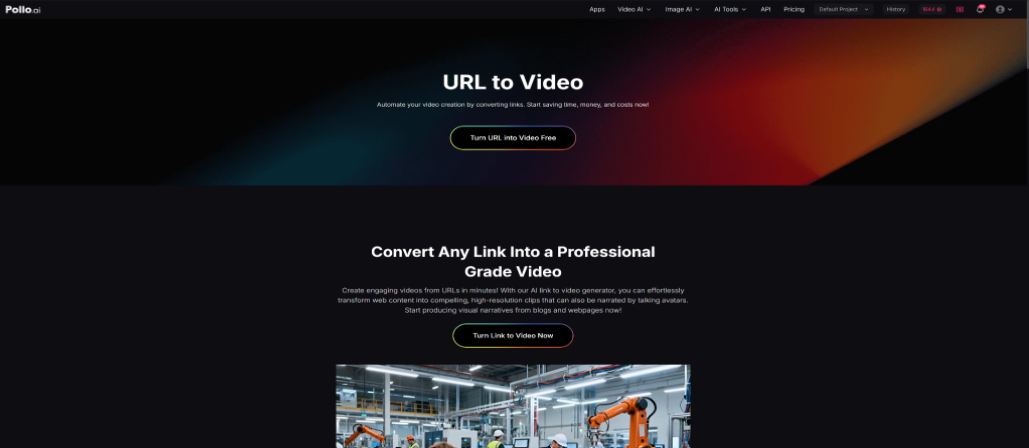
A link to video generator is a tool that converts URLs, articles, webpages, or online content into structured video outputs using AI automation or template-based editing systems. These tools are widely used by marketers, content creators, educators, and businesses to repurpose written or web-based content into engaging videos for platforms such as TikTok, YouTube, and Instagram. This guide evaluates five popular link to video generator tools—Pollo AI, HeyGen, Canva, InVideo AI, and Kapwing—focusing on how each tool transforms links into videos, their core features, strengths, and practical use cases. Instead of only listing capabilities, the article also explains where each tool performs best in real workflows, such as content repurposing, marketing automation, educational videos, and social media production. The goal is to help users choose a suitable solution based on automation level, editing control, and output style.
Pollo AI Link to Video Generator
Pollo AI functions as an AI-powered link to video generator designed to convert URLs, scripts, and raw content into structured video outputs with minimal manual editing. The system interprets input content and automatically builds a sequence of scenes, combining visuals, transitions, and basic narrative flow. Instead of requiring users to manually arrange timelines or media assets, it focuses on automated video assembly.
Key features include AI-driven scene generation, support for multiple input types (such as links and text), automated visual matching, and fast rendering for short-form and marketing videos. It is built to reduce production complexity while maintaining a coherent visual output suitable for digital platforms.
Why it stands out
Pollo AI stands out primarily due to its strong automation capability. It reduces the entire link-to-video process into a near one-step workflow, making it especially useful for users who prioritize speed over manual editing control. This makes it practical for content marketers who need to convert blog posts, landing pages, or product URLs into videos quickly.
Its main advantage is scalability. Users can produce multiple video variations from a single input, which supports A/B testing in marketing campaigns or frequent social media posting. The output tends to be structured, visually consistent, and optimized for short-form platforms such as TikTok, Instagram Reels, and YouTube Shorts. While customization is more limited compared to traditional editors, the efficiency and automation make it suitable for high-volume content pipelines.
HeyGen Link to Video Generator
HeyGen operates as a link to video generator with a focus on AI avatars and presenter-style video creation. Instead of simply turning links into slides or stock footage videos, it transforms content into scripted presentations delivered by virtual AI presenters. Users can input text, summaries, or webpage content, which is then converted into structured video narration.
Key features include AI avatar presenters, text-to-video conversion, multilingual voice options, and script-based editing. It is designed to turn informational content into professional-looking talking-head videos without the need for filming equipment or real actors.
Why it stands out
HeyGen stands out because it introduces a human-like presentation layer to link-based video generation. This makes it particularly effective for corporate communication, training materials, and educational content where clarity and engagement are important.
Its main advantage is communication quality. Instead of purely visual storytelling, it delivers information in a presenter format that improves viewer retention for explanatory content. It is commonly used for onboarding videos, product explainers, and internal training materials. The final output feels structured and professional, making it suitable for business and educational environments where credibility and clarity matter more than cinematic effects.
Canva Link to Video Generator
Canva integrates link to video generator capabilities within its broader design platform. Users can import content from URLs or manually extract key elements and convert them into video formats using templates. The workflow is guided rather than fully automated, allowing users to structure content visually using drag-and-drop tools.
Key features include video templates, animation tools, brand kits, stock media integration, and simple timeline editing. Canva supports both static and dynamic content transformation, making it suitable for users who want design control over their video output.
Why it stands out
Canva stands out due to its balance between accessibility and design flexibility. While it does not fully automate link-to-video conversion, it gives users strong control over visual branding and layout customization.
It is especially useful for small businesses, educators, and social media managers who want consistent brand presentation. The output quality is typically clean and visually structured, making it suitable for marketing announcements, educational snippets, and branded content. Although it requires more manual input compared to AI-first tools, it offers better visual control and customization, which is important for brand consistency.
InVideo AI Link to Video Generator
InVideo AI functions as a structured link to video generator that converts URLs and text-based content into storyboard-driven videos. It extracts key information from input sources and builds a video sequence using stock footage, AI narration, and automated transitions.
Key features include AI script generation, automatic scene selection, stock media library access, voiceover support, and template-based editing. The system is designed to streamline the transformation of written content into video format with minimal manual effort.
Why it stands out
InVideo AI stands out because it combines automation with structured storytelling. Unlike fully generic AI generators, it organizes content into a logical storyboard, which improves clarity and narrative flow.
It is particularly useful for marketers, affiliate creators, and educators who need to convert articles, listicles, or blog posts into video summaries. The output is generally polished and suitable for YouTube, promotional content, and educational explainers. Its strength lies in balancing automation with readability, making it a practical option for scalable video production workflows.
Kapwing Link to Video Generator
Kapwing offers a browser-based link to video generator workflow that allows users to import web content and transform it into editable video timelines. It supports both automated extraction and manual editing, giving users control over how content is structured and refined.
Key features include URL importing, subtitle generation, timeline editing, meme tools, and collaborative editing. Unlike fully automated systems, Kapwing emphasizes post-import customization and hands-on editing flexibility.
Why it stands out
Kapwing stands out because of its editing flexibility after content import. While it can convert links into video drafts, its real strength lies in allowing users to refine every element of the output.
It is commonly used for social media content, meme videos, and quick repurposing tasks. The platform is particularly effective when users need to adjust timing, captions, or visuals after initial generation. The final output quality depends heavily on user editing input, but it provides strong control for creators who prefer a hybrid workflow between automation and manual design.
Conclusion
Link to video generator tools differ significantly in how they handle automation, design control, and output style. Pollo AI focuses on high-speed automation for scalable content production. HeyGen adds a presenter layer for structured communication. Canva prioritizes design flexibility and branding control. InVideo AI offers structured storytelling for content repurposing, while Kapwing provides the most editing freedom after conversion.
The best choice depends on whether the user prioritizes automation, presentation style, branding control, or post-editing flexibility in their video production workflow.

Why Audiobook Narration Is Becoming a Popular Freelance Skill?

Understanding Angelnae: A Comprehensive Guide

Discover Fanisco: A Comprehensive Guide to Its Features, Benefits, and Industry Impact