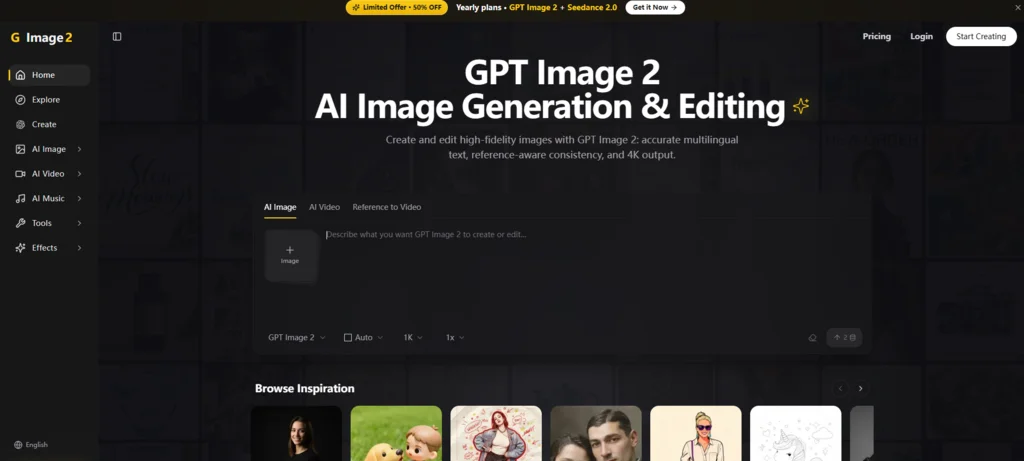
Everyone talks about the first generation. That magical moment when you type a prompt and a beautiful image appears. But for anyone who actually uses AI for professional work, the first generation is rarely the final one. The real value lies in what happens next: tweaking, fixing, adjusting, and refining until the visual matches your exact requirements. Most tools treat editing as an afterthought – a separate process that forces you to export to Photoshop or regenerate from scratch. Image 2 flips that script by embedding powerful editing capabilities directly into the generation workflow, making iteration not just possible but natural.
Why Generation Alone Is Never Enough
A single prompt can never capture all the nuances of a finished visual. You might want to reposition an object, change a color, fix a typo in the text, or adjust the mood of the background. Regenerating the entire image based on a modified prompt is a lottery – you might get the change you wanted, but you also lose everything else that was working. This brute-force approach is inefficient and frustrating, especially when you have already invested time in curating the perfect composition.
The alternative is to use a tool that treats the generated image as a starting point, not an endpoint. The editing features must be local, precise, and responsive. They should allow you to modify specific regions without affecting the rest, and they should understand natural-language instructions so you do not have to learn a new interface language. This is precisely the philosophy behind the platform we are examining.
Putting Editing at the Center of the Workflow
Instead of separating generation and editing into distinct phases, the platform integrates them into a single continuous loop. You generate, you edit, you generate again with the edits applied, you edit further – until you reach the desired outcome. This iterative cycle is facilitated by a clear, step-by-step process that feels more like a conversation with the tool than a technical operation.
Step 1: Generate or Upload Your Base Image
Starting Point Options
You can either begin with a text prompt to create a new image or upload an existing image from your device. The uploaded image can be a rough sketch, a low-resolution photo, or a previous generation that you want to enhance. The platform accepts common formats like JPG, PNG, and WebP, and it upscales images to higher resolutions when needed.
Step 2: Identify the Area You Want to Modify
Local Selection Tools
After the base image appears, you can select a specific region using a simple brush or box tool. This selection tells the system which part of the image should be changed. The selection does not need to be pixel-perfect – the AI interprets the boundaries intelligently – but a rough outline is sufficient to isolate the target area.
Step 3: Describe the Modification in Plain Language
Natural-Language Edit Instructions
Once the area is selected, you type a description of what you want to change. For example, you might write “replace the red car with a blue truck,” “remove the watermark,” “change the background from indoors to a beach sunset,” or “make the text read ‘New Collection 2026’.” The system processes this instruction and applies it only to the selected region, leaving the rest of the image untouched. This is a significant departure from tools that only support global edits or require you to retype the entire prompt.
Step 4: Review, Adjust, and Export
Iterative Refinement and Final Output
After the edit is applied, you can review the result. If it is not exactly what you envisioned, you can select a different area or rephrase the instruction and try again. This back-and-forth is fast enough that you can explore multiple variations in a single session. Once you are satisfied, you export the final image in high resolution. The platform also allows you to export editable layers in certain formats, though the primary output is a standard image file suitable for any use.
Testing the Iteration Loop in Real Scenarios
To evaluate how well this editing-first workflow performs, I ran a series of practical tests that mirror actual creative demands.
Scenario: Correcting Product Photography. I generated a product image of a leather wallet on a wooden table. The brand logo was slightly off-center, and the reflection on the table was too harsh. Using the local selection, I isolated the logo area and instructed the system to “center the logo and increase its opacity slightly.” The correction was applied cleanly. Then I selected the table surface and wrote “soften the reflection to a subtle glow.” The system adjusted the lighting without affecting the wallet itself. The entire process took under two minutes – a task that would have required layered masks and multiple adjustments in traditional editing software.
Scenario: Updating Campaign Text. I created a social media banner with a headline and a call-to-action button. The marketing team decided to change the headline wording. Instead of regenerating the entire banner, I selected the text area and typed the new headline. The system rendered the new text in the same font, color, and position as the original, maintaining visual consistency. The button text was modified similarly. This is a common pain point in AI image tools, and the platform handled it with impressive fidelity.
Scenario: Style Transfer with Localization. I had a portrait image that I wanted to convert to a watercolor style, but only for the subject, not the background. I selected the subject’s face and body, then described “apply watercolor brush effect.” The background remained photorealistic. The result was a cohesive hybrid that would have been difficult to achieve with global style filters.
In these tests, the editing was not flawless every time. Sometimes the system misinterpreted the region boundary, or the generated modification did not fully match the style of the original image. Rephrasing or adjusting the selection often resolved these issues, but it required an extra attempt. The iteration loop is smooth, but it does demand some patience and experimentation – especially for complex multi-object scenes.
What You Should Know Before Relying on It
The editing capabilities are a major strength, but they come with inherent limitations that affect their practical usefulness.
First, the system’s ability to interpret editing instructions is heavily dependent on the clarity of your language. Vague commands like “make it better” produce inconsistent results, while specific, concrete instructions yield predictable outcomes. This is a user-side factor that can be improved with practice, but it is worth noting for those who expect mind-reading AI.
Second, the local editing works best on relatively small areas. If you select half the image and ask for a dramatic change, the system may struggle to maintain coherence with the other half. For broad changes, it is often better to regenerate with a modified prompt rather than edit locally.
Third, the platform does not provide a history or undo stack beyond the most recent edit. If you make a change and then change your mind, you may need to re-upload the previous version. This is a usability gap that would benefit from a versioning feature.
Fourth, while the output resolution is high, the editing process may slightly reduce sharpness in modified areas if you perform multiple rounds. In practice, this degradation is minor and only visible on close inspection, but it is something to be aware of for large-format printing.
A Practical Takeaway for Different Creative Roles
The editing-first approach fundamentally changes how you interact with AI image generation. Instead of viewing each generation as a standalone product, you treat it as a raw material that you sculpt.
For graphic designers, this means you can offload tedious adjustments to the AI while retaining creative control over the composition. You generate a base image, then use local edits to fine-tune elements until they match your vision – all without opening a separate application.
For content creators, the rapid iteration reduces the friction of producing multiple variants for A/B testing or platform-specific formats. You can generate a hero image for a blog post, then edit it for Instagram, then again for a LinkedIn banner, each time adjusting only the necessary aspects.
For e-commerce managers, the ability to update product imagery quickly – changing backgrounds, colors, or text overlays – directly impacts time-to-market. You are not waiting for a design agency to revise a batch of images.
The platform does not pretend to replace professional editing suites for fine art or high-end retouching. But for the vast majority of commercial visual content, the integrated editing loop offers a practical, time-saving alternative to the generate-and-fix paradigm. It turns the hidden half of AI creation – the editing phase – into a first-class citizen of the workflow. And that, from a practical user perspective, is where the real productivity gains lie. Whether you are iterating on a concept, correcting a minor flaw, or adapting an asset for a new purpose, the ability to make changes directly and immediately transforms the tool from a novelty into a dependable workhorse. Image 2 embodies this transformation, and its editing-first design is the reason it stands out in a crowded field.
FastTurnPCBs Trends Driving Innovation in Electronics Manufacturing
Tech Hence: The Future of Technology Unveiled

Need to Open a MOV File? Here's Everything You Need to Know