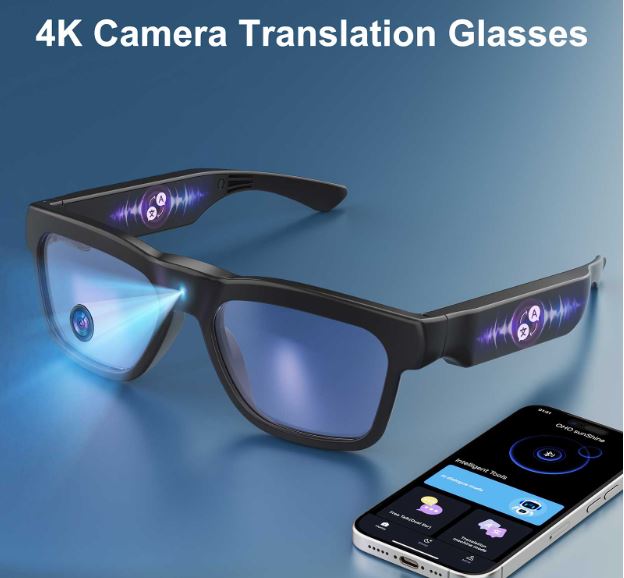
Remote work has fundamentally reshaped how professionals connect, and with the average knowledge worker now spending over four hours daily on video calls, digital eye strain has become a genuine occupational hazard. Burning eyes, persistent headaches, and blurred vision after back-to-back meetings are no longer minor inconveniences—they’re productivity killers. Blue light glasses emerged as a practical first line of defense, shielding your eyes from the high-energy wavelengths emitted by laptop and monitor screens.
Yet eye protection is only part of the story. Today’s conference calls demand more than just comfort—they require seamless execution across languages, time zones, and packed schedules. Fumbling with devices mid-presentation, struggling to follow a colleague speaking in Mandarin, or scrambling to capture action items while simultaneously speaking all chip away at meeting effectiveness. Modern smart glasses now integrate blue light filtering with hands-free calling, real-time translation, and audio transcription, transforming a simple wellness accessory into a powerful communication hub. This guide walks business professionals through exactly how to harness that full potential for truly seamless conference calls.
Understanding Blue Light Glasses: Your First Step to Better Conference Calls
Blue light glasses are lenses engineered with specialized coatings or filtering materials that block or absorb high-energy visible light in the 400–490 nanometer range—the wavelengths most commonly emitted by LED monitors, laptop screens, and smartphone displays. When you spend hours on video calls, your eyes are continuously exposed to this concentrated light source, triggering a cascade of discomfort that researchers call digital eye strain.
The benefits extend well beyond simple comfort. By reducing the intensity of blue light reaching your retinas, these glasses measurably decrease eye fatigue, allowing you to maintain sharper focus through a full afternoon of back-to-back meetings. They also support better sleep quality—blue light suppresses melatonin production, so filtering it during evening calls helps your body wind down naturally afterward. For business professionals whose schedules routinely include early-morning standups and late-night cross-timezone syncs, that recovery benefit is significant.
What makes blue light glasses particularly relevant today is how rapidly the technology surrounding them has evolved. Brands like ohosunshine have been at the forefront of this shift, developing frames that embed microphones, speakers, Bluetooth chipsets, and even AI-powered software while remaining indistinguishable from standard eyewear. The result is a new category of smart glasses that preserves the core eye-health function while layering in communication capabilities purpose-built for the modern professional’s meeting-heavy workday.
Beyond Eye Care: The Smart Glasses Revolution in Business
The blue light glasses sitting on your nose are no longer just a passive wellness accessory. Engineers and product designers have spent the last several years embedding microphones, directional speakers, Bluetooth 5.0 chipsets, and AI-driven software into frames engineered to look like ordinary eyewear. The result is a category of smart glasses that delivers eye protection and serious communication muscle in a single, unobtrusive package—exactly what business professionals navigating dense meeting schedules need.
Hands-Free Calling: Unleashing Productivity in Meetings
Built-in microphones and open-ear speakers connect to your laptop or smartphone via Bluetooth, letting you join a conference call the moment you put your glasses on. Your hands stay free to gesture during a presentation, pull up a shared document, or jot down action items without ever reaching for a headset. That freedom eliminates the device-juggling that breaks focus and signals disengagement to everyone else on the call.
Real-Time Translation and Audio Transcription: Keys to Global Collaboration
For teams spread across continents, language gaps are a persistent drag on meeting efficiency. Smart glasses with AI-powered translation process spoken dialogue and deliver translated audio or on-screen text in near real time, so a negotiation with a Tokyo partner or a sprint review with a Berlin engineering team flows without the awkward pauses of manual interpretation. Equally valuable is automatic audio transcription, which converts the entire call into a searchable text record the moment the meeting ends. Instead of relying on one person’s rushed notes, every decision and commitment is captured verbatim, ready to feed directly into project management tools or a CRM. Together, these features compress the gap between having a meeting and acting on its outcomes—turning smart glasses into an end-to-end collaboration platform that starts with protecting your eyes and ends with a fully documented, globally inclusive conversation.
Step-by-Step Guide: Setting Up Your Blue Light Glasses for Seamless Calls
Getting the most from smart blue light glasses requires a deliberate setup process rather than simply unboxing and joining your next call. Follow these five steps to ensure everything works flawlessly before a real meeting is on the line.
Step 1: Choose the right pair. Not all blue light glasses include smart features, so verify that your chosen frames offer built-in microphones, open-ear speakers, and Bluetooth connectivity. Check compatibility with your primary devices—both your work laptop and smartphone—and confirm the battery life can sustain your longest typical meeting block, ideally four or more hours on a single charge.
Step 2: Pair your devices. Enable Bluetooth on your laptop and smartphone, then follow the manufacturer’s pairing instructions to connect the glasses to both. Download any companion app required for advanced features like translation or transcription, and grant the necessary microphone and notification permissions during installation.
Step 3: Configure audio settings. In your video conferencing platform—Zoom, Teams, or Google Meet—navigate to audio settings and select the glasses as both your input microphone and output speaker. Run the platform’s built-in mic test to confirm your voice comes through clearly and adjust microphone sensitivity if background noise is an issue.
Step 4: Activate translation and transcription. Inside the companion app, enable real-time translation and select your target language. Turn on audio transcription and link your preferred storage destination, whether that’s a cloud folder, a project management tool, or a CRM integration.
Step 5: Run a mock call. Schedule a five-minute test session with a colleague or use a solo recording feature. Verify audio quality, confirm translated output appears correctly, and check that the transcription file saves to the right location before your first live meeting.
Solving Core Business Needs: Practical Applications and Solutions
Smart glasses earn their place in a professional’s toolkit when they solve real problems in real meeting scenarios. For hands-free communication, consider the virtual presenter who needs to advance slides, reference notes, and maintain eye contact simultaneously—built-in audio handles the call while both hands remain on the keyboard. Walking meetings, increasingly popular for creative brainstorming, become genuinely viable when you’re not tethered to a desk by a headset cable. Multitasking during a call, whether pulling up a contract or updating a spreadsheet, no longer means muting yourself and fumbling with earbuds.
Cross-border negotiations and international team syncs expose where real-time translation delivers the sharpest ROI. To optimize translation accuracy, speak in clear, moderately paced sentences and avoid heavy idiomatic language or acronyms the AI may misinterpret. Before a high-stakes call with a new international partner, run a brief vocabulary test in the companion app to flag any domain-specific terms that need manual correction in the translation dictionary.
Transcription integration is where efficiency gains compound. Most companion apps support direct export to tools like Notion, Salesforce, or Asana. Map your export settings once so that every meeting automatically populates a CRM contact record or a project task board with verbatim notes. This eliminates the error-prone step of manually transcribing action items after the call, ensuring commitments made in a Monday morning sync appear in the team’s tracker before the hour is up.
Optimizing Your Experience: Tips and Best Practices
Smart glasses perform best when you treat them as precision instruments rather than disposable accessories. Clean the lenses daily with a microfiber cloth—fingerprints and smudges degrade both optical clarity and the blue light filtering coating over time. Charge the frames each evening so you begin every workday with a full battery; running out of power mid-call is avoidable with a consistent routine. Check the companion app weekly for firmware updates, as manufacturers routinely push improvements to noise cancellation algorithms, translation accuracy, and transcription formatting through software alone.
Privacy deserves deliberate attention. Always-on microphones are convenient but carry risk—mute the glasses at the hardware level when discussing sensitive information outside a formal call, and review your companion app’s data retention settings to control how long audio recordings and transcripts are stored on external servers. Inform call participants when transcription is active, both as a professional courtesy and to comply with recording consent laws in your jurisdiction.
To build a truly holistic setup, pair your smart glasses with a second monitor dedicated to shared documents, freeing your primary screen for the video feed. Avoid the common pitfall of skipping the mock call step after any major software update—new firmware can reset audio routing preferences, silently breaking your microphone selection in Zoom or Teams before a critical meeting.
From Eye Protection to Full Meeting Mastery
Blue light glasses began as a straightforward solution to a straightforward problem—too many hours staring at screens, too much eye strain to sustain productive work. That foundation remains essential. Filtering high-energy wavelengths during back-to-back video calls genuinely reduces fatigue, sharpens focus, and protects sleep quality in ways that compound over a demanding workweek.
But the professionals who will gain the most from this technology are those who embrace what it has become. Smart glasses that combine blue light filtering with hands-free calling, real-time translation, and automatic transcription don’t just protect your eyes—they remove the friction that makes conference calls exhausting in the first place. Language barriers dissolve, action items capture themselves, and your hands stay free to do the work that actually moves projects forward.
The steps are straightforward: choose the right pair, configure your audio and translation settings deliberately, run a mock call before anything critical, and build maintenance habits that keep the technology performing at its best. Each investment of effort compounds into meetings that are clearer, faster, and more inclusive regardless of where participants are located.
Wearable technology’s role in business communication is only expanding. As AI translation accuracy improves and transcription tools integrate more deeply with enterprise software, smart glasses will become as standard in a professional’s setup as a quality webcam or noise-canceling headset. Getting comfortable with the integrated approach now positions you ahead of that curve—and gives your eyes a well-deserved break along the way.

Top 7 Artificial Intelligence Courses in India (2026): Fees, Placement & Certification

The AI Skills Gap Is Growing and Here's How Companies Are Closing It.
The Hidden Half of AI Image Creation – Editing, Iteration, and Control